![[PukiWiki]](image/pukiwiki.png "[PukiWiki]")
山本?
1.ハード構築
・Arduinoとe-healthとwifiモジュールを接続する
・Arduinoに脈波センサと体温センサを接続しPCと接続
※ハードの画像
接続方法が分からない場合は以下のURLを参照
e-healthのチュートリアル
https://www.cooking-hacks.com/documentation/tutorials/ehealth-biometric-sensor-platform-arduino-raspberry-pi-medical
wifiモジュールのチュートリアル
https://www.cooking-hacks.com/blog/tutorial-wifi-module-for-arduino-roving-rn-xvee
2.PC内の環境構築
・ArduinoIDEのインストール
以下のURLからArduinoIDEのver1.0.5をそれぞれのPCに合わせた環境でインストールする
※既に別verでのIDEをインストールしている場合は追加でインストールする(アンインストールする必要はない)
https://www.arduino.cc/en/Main/OldSoftwareReleases#1.0.x
・e-healthライブラリの導入
以下のURLのUsing the library with Arduinoの項のV2.4のライブラリをダウンロード
https://www.cooking-hacks.com/documentation/tutorials/ehealth-biometric-sensor-platform-arduino-raspberry-pi-medical
その後解凍し,\Documents\Arduino\librariesに解凍したものを入れてArduinoIDEを起動する
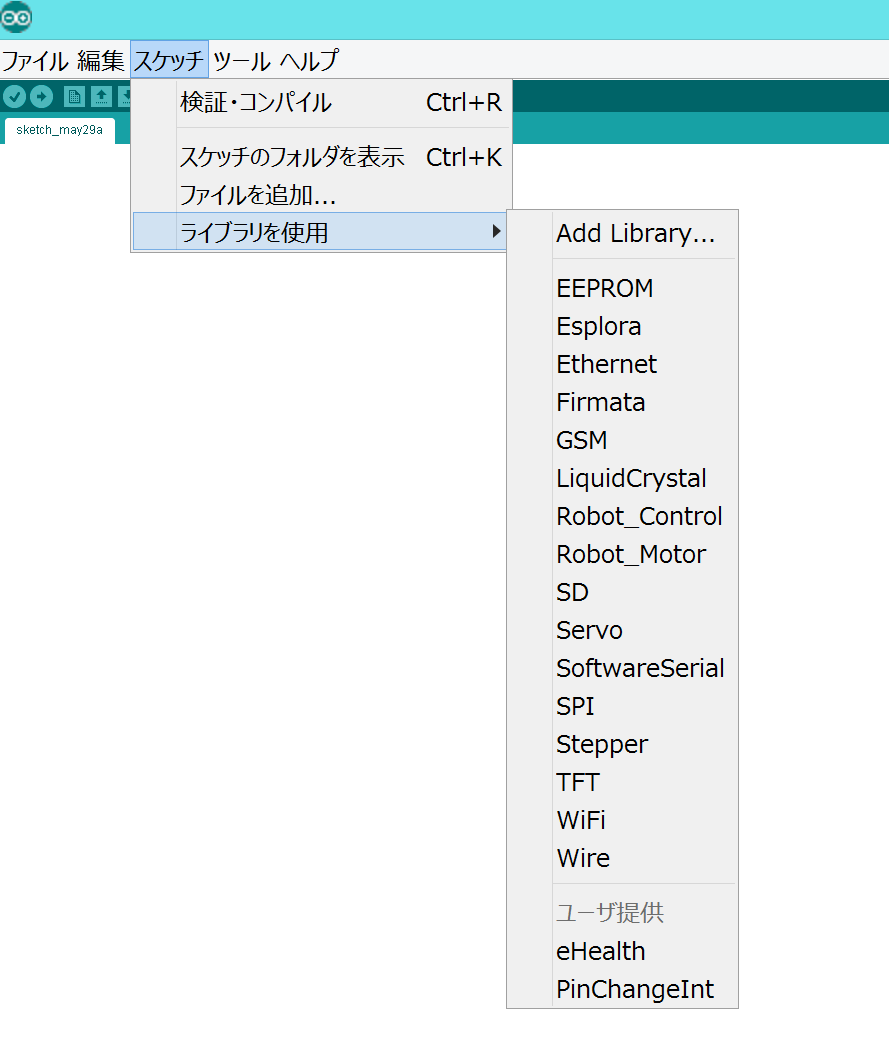
起動するとスケッチのユーザ提供にeHealthとPinChangeIntというライブラリが追加されていればOK
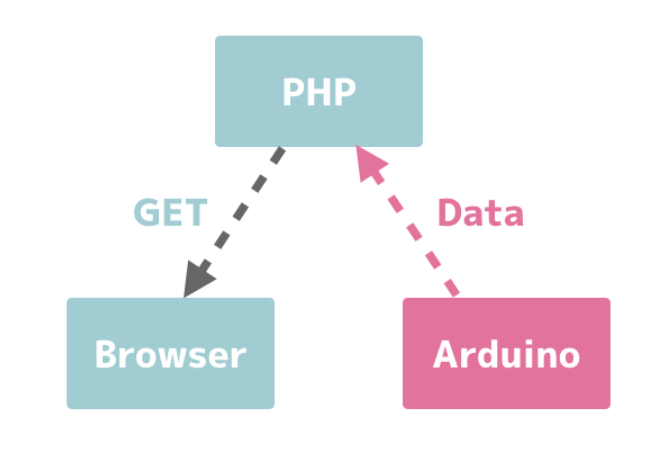
void setup(){
}
void loop(){
}
マイコンボードに書き込む際にXbeeシールドのスイッチがUSB側になっているのを確認するset wlan join 0 set wlan phrase basestation←使用するルータのパスワード join AirMacTimeCapsule←使用するルータのIPアドレス set dns address 192.168.0.1 set ip host 192.168.0.103←自分のPCのIPアドレスに変更 set ip gateway 192.168.0.1 set ip address 192.168.0.70 set ip remote 8080 set opt format 1 get ip saveコマンド実行後以下の画像のように表示されていればok
#include <PinChangeInt.h>
#include <eHealth.h>
//Enter here your data
const char wifi_ssid[] = "AirMacTimeCapsuleKO";←用いるルータのSSID
const char wifi_password[] = "basestation";←用いるルータのパスワード
const char host[] = "192.168.0.103";←用いるPCのIP
const char gateway[] = "192.168.0.1";
const char server[] = "192.168.0.70";
const char host_port[] = "8080";
//const char GET[] = "test.php?Temperature=20&PRbpm=45";
const char GET[] = "test.php?Temperature=20&PRbpm=45";
int8_t answer;
char response[300];
char response2[100];
int cont;
char aux_str[100];
int s=1;

char value[50];

void setup()
{
  //Write here you correct baud rate
  Serial.begin(9600);
  //Serial.begin(115200);

  wificonfig();
    eHealth.initPulsioximeter();

  //Attach the inttruptions for using the pulsioximeter.
  PCintPort::attachInterrupt(6, readPulsioximeter, RISING);
}

void loop()
{

  Serial.println(F("Sending HTTP GET"));

  delay(5000);
  while(s>0){
  Serial.print("PRbpm : ");
  Serial.print(eHealth.getBPM());

  Serial.print("    %SPo2 : ");
  Serial.print(eHealth.getOxygenSaturation());

  Serial.print("\n");
  Serial.println("=============================");
  delay(500);

  float temperature = eHealth.getTemperature();

  Serial.print("Temperature (ºC): ");
  Serial.print(temperature, 2);
  Serial.println("");

  sendGET(temperature,eHealth.getBPM());
  delay(1000);	// wait for a second
  }
}


void wificonfig() {

  Serial.println(F("Setting Wifi parameters"));
  sendCommand("exit\r","EXIT",2000);
  delay(2000);

  enterConfig(2000);
  sendCommand("leave\r","DeAuth",2000);
  delay(1000);
  // Sets DHCP and TCP protocol
  sendCommand("set ip dhcp 1\r","AOK",2000);
  delay(1000);
  sendCommand("set ip protocol 18\r","AOK",2000);
  delay(1000);

  // Configures the way to join the network AP, sets the encryption of the
  // network and joins it
  sendCommand("set wlan join 0\r","AOK",2000); //The auto-join feature is  disabled
  delay(1000);

  snprintf(aux_str, sizeof(aux_str), "set wlan phrase %s\r", wifi_password);
  sendCommand(aux_str,"AOK",2000);
  delay(1000);
  snprintf(aux_str, sizeof(aux_str), "join %s\r", wifi_ssid);
  answer = sendCommand(aux_str,"Associated",10000);


  if (answer == 1){

    snprintf(aux_str, sizeof(aux_str), "Connected to \"%s\"", wifi_ssid);
    Serial.println(aux_str);
    delay(5000);
  }

  else {
    snprintf(aux_str, sizeof(aux_str), "Error connecting to: \"%s\"", wifi_ssid);
    Serial.println(aux_str);
    delay(1000);
  }


  Serial.println(F("Wifi succesfully configured"));
  delay(1000);
}


void sendGET(float Temperature,int PRbpm) {

  enterConfig(2000);
  //sendCommand("set i h 0\r","AOK",2000);
  delay(1000);
  //snprintf(aux_str, sizeof(aux_str), "set d n %s\r", server);
  //sendCommand(aux_str,"AOK",2000);
  delay(1000);
  snprintf(aux_str, sizeof(aux_str), "set dns address %s\r", gateway);
  sendCommand(aux_str,"AOK",2000);
  delay(1000);
  snprintf(aux_str, sizeof(aux_str), "set ip host %s\r", host);
  sendCommand(aux_str,"AOK",2000);
  delay(1000);
  snprintf(aux_str, sizeof(aux_str), "set ip gateway %s\r", gateway);
  sendCommand(aux_str,"AOK",2000);

  delay(1000);
  snprintf(aux_str, sizeof(aux_str), "set ip address %s\r", server);
  sendCommand(aux_str,"AOK",2000);
  delay(1000);
  //Configures HTTP connection
  snprintf(aux_str, sizeof(aux_str), "set ip remote %s\r", host_port);
  sendCommand(aux_str,"AOK",2000);
  delay(1000);

  sendCommand("set opt format 1\r","AOK",2000);
  delay(1000);

  dtostrf(Temperature,5,2,value);

  snprintf(aux_str, sizeof(aux_str), "set comm remote GET$/test.php?Temperature=%s&PRbpm=%d\r", value,PRbpm);
  sendCommand(aux_str,"AOK",10000);
  delay(1000);

  // Calls open to launch the configured connection.
  sendCommand("open\r","*CLOS*",10000);
  delay(1000);

  findResponse();

}


void findResponse(){
  Serial.println(response);
  boolean go_On = true;
  uint16_t counter = 0;

  while (go_On){

    if (response[counter] == '\r'){

      if (response[counter+1] == '\n'){

        if (response[counter+2] == '\r'){

          if (response[counter+3] == '\n'){

            go_On = false;
          }

        }

      }

    }

    counter++;
  }
  counter = counter + 3;

  for (int i=0;response[i+counter]!='*'; i++){
    response2[i] = response[i+counter];
    delay(100);


  }

  snprintf(aux_str, sizeof(aux_str), "GET response:\"%s\"", response2);
  Serial.println(aux_str);


}


int8_t sendCommand(const char* Command, const char* expected_answer, unsigned int timeout){

  uint8_t x=0,  answer=0;
  unsigned long previous;

  memset(response, 0,300);    // Initialize the string

  delay(100);

  while( Serial.available() > 0) Serial.read();    // Clean the input buffer

  Serial.println(Command);    // Send Command

    x = 0;
  previous = millis();

  // this loop waits for the answer
  do{
    if(Serial.available() != 0){
      // if there are data in the UART input buffer, reads it and checks for the asnwer
      response[x] = Serial.read();
      x++;
      // check if the desired answer  is in the response of the module
      if (strstr(response, expected_answer) != NULL)
      {
        answer = 1;
      }
    }
  }
  // Waits for the asnwer with time out
  while((answer == 0) && ((millis() - previous) < timeout));

  return answer;
}


int8_t enterConfig(unsigned int timeout){

  uint8_t x=0,  answer=0;
  unsigned long previous;

  memset(response, 0,300);    // Initialize the string

  delay(100);

  while( Serial.available() > 0) Serial.read();    // Clean the input buffer

  Serial.print("$$$");    // Send Command


  x = 0;
  previous = millis();

  // this loop waits for the answer
  do{
    if(Serial.available() != 0){
      // if there are data in the UART input buffer, reads it and checks for the asnwer
      response[x] = Serial.read();
      x++;
      // check if the desired answer  is in the response of the module
      if (strstr(response, "CMD") != NULL)
       {
        answer = 1;
      }
    }
  }
  // Waits for the asnwer with time out
  while((answer == 0) && ((millis() - previous) < timeout));

  return answer;
}

void readPulsioximeter(){

  cont ++;

  if (cont == 50) { //Get only of one 50 measures to reduce the latency
    eHealth.readPulsioximeter();
    cont = 0;
  }
} <?php
$filename = "data.txt";
$data1 = $_GET['Temperature'];
$data2 = $_GET['PRbpm'];
if($data1=='a'){
$fp = fopen($filename, "r");
$contents = fread($fp, filesize($filename));
print($contents);
fclose($fp);
}
else{
$fp = fopen($filename, 'a');
date_default_timezone_set('Asia/Tokyo');
fwrite($fp, date("Y-m-d H:i:s")."\t".$data1."\t".$data2."\r\n");
fclose($fp);
}
?>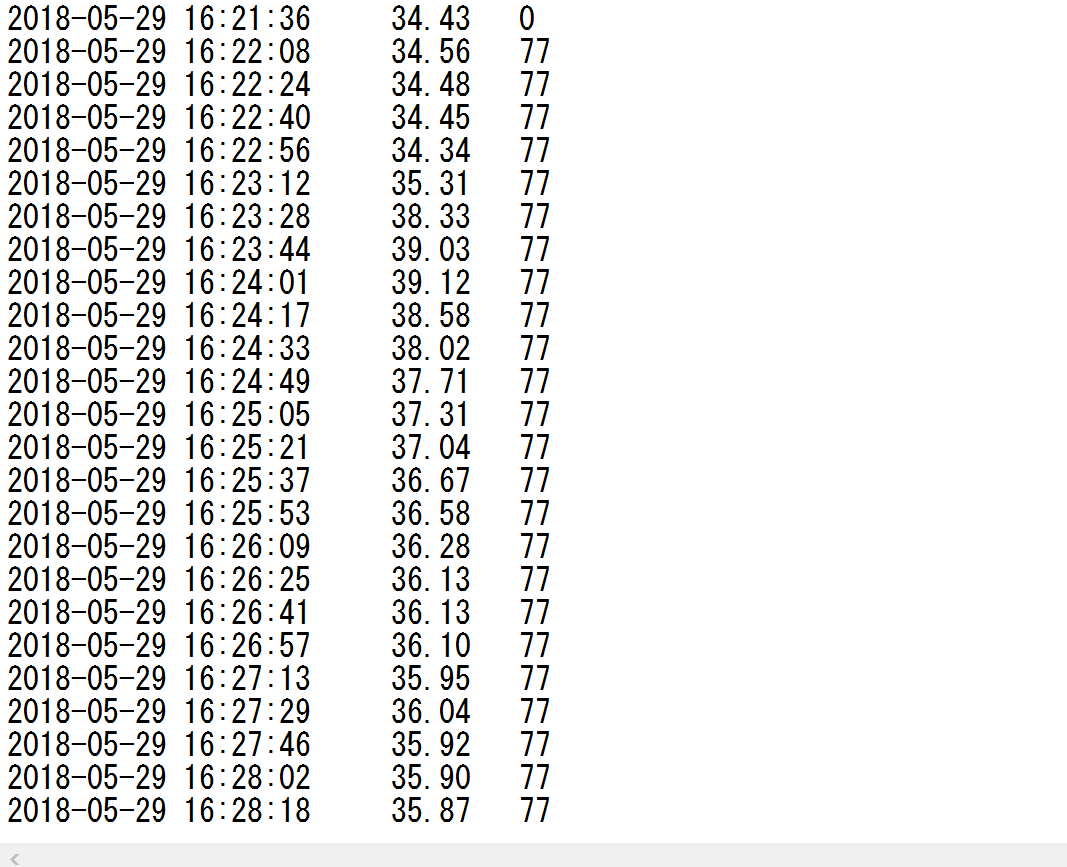
localhost:8080/test.php?Temperature=a&PRbpm=a~と入力するとブラウザにdata.txtの結果が表示される
以下のURLよりgnuplotをインストールする
https://sourceforge.net/projects/gnuplot/files/gnuplot/
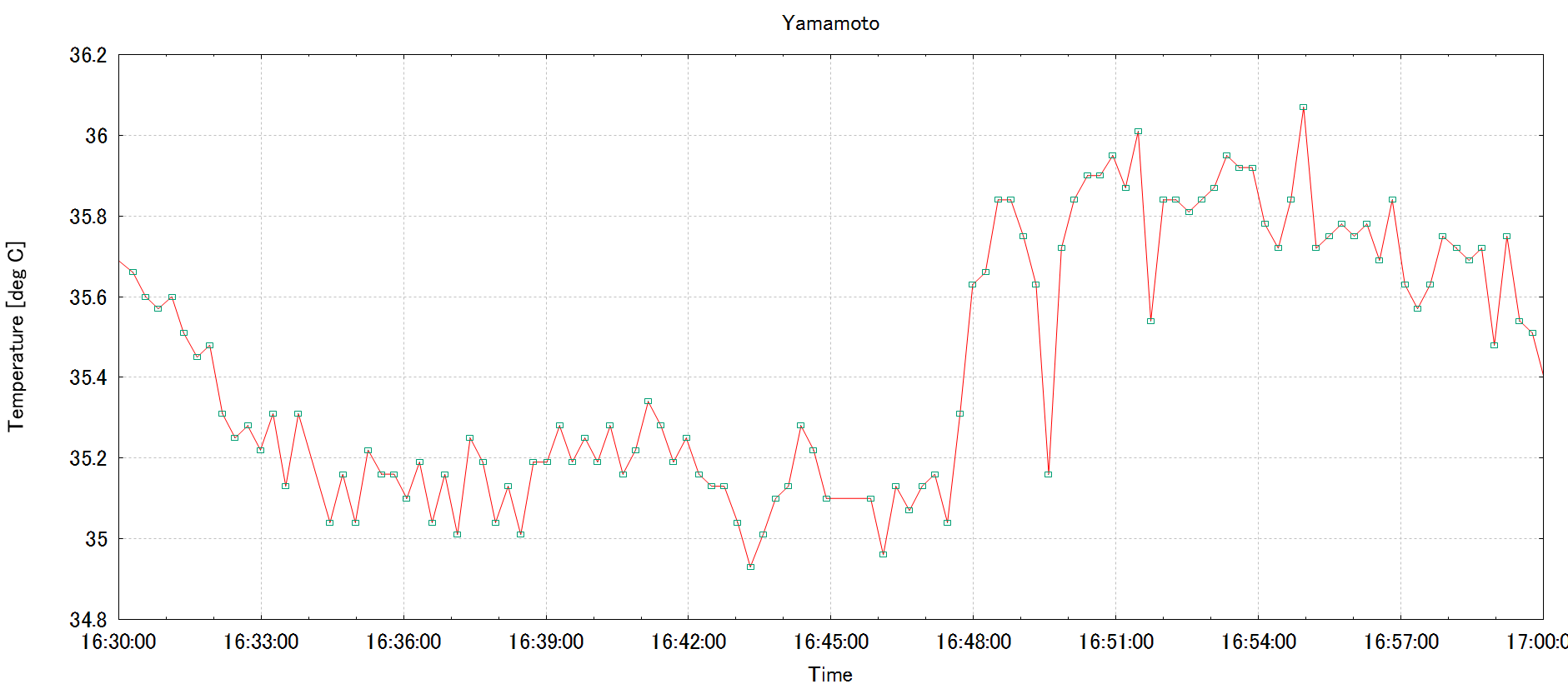
C:\Program Files\gnuplot\binよりwgnuplot.exeを起動,以下のコマンドを実行
set xdata time
set timefmt "%H:%M:%S"
set xrange ["16:30:00":"17:00:00"]
set grid
set xlabel 'Time'
set ylabel 'Temperature [deg C]'
set title  'Yamamoto'
p "data.txt" u 2:3 w l lc rgb "#FF0000" notitle,"data.txt" u 2:3 w p pt 4 ps 0.5 notitle
2:3の2は時刻,3は体温を指定しているので3を4に変更すると脈拍のグラフを表示できる
以下実行結果画像
e-Health Sensor Platform V2.0 for Arduino and Raspberry Pi
https://www.cooking-hacks.com/documentation/tutorials/ehealth-biometric-sensor-platform-arduino-raspberry-pi-medical
Tutorial: Wifi Module for Arduino "Roving RN-XVee"
https://www.cooking-hacks.com/blog/tutorial-wifi-module-for-arduino-roving-rn-xvee
wifiモジュールのコマンド集
http://www.cooking-hacks.com/skin/frontend/default/cooking/pdf/WiFly-RN-UM.pdf
e-healthに関する質問はこちらのプラットホームで
https://www.cooking-hacks.com/forum/index.php?sid=5acefe808eaee4df9c2a93b60c718a0a
ArduinoIDEの参考にしたコード
https://www.cooking-hacks.com/forum/viewtopic.php?f=20&t=10124&sid=10f3bb6d33397da94b6e5d01e114deb5
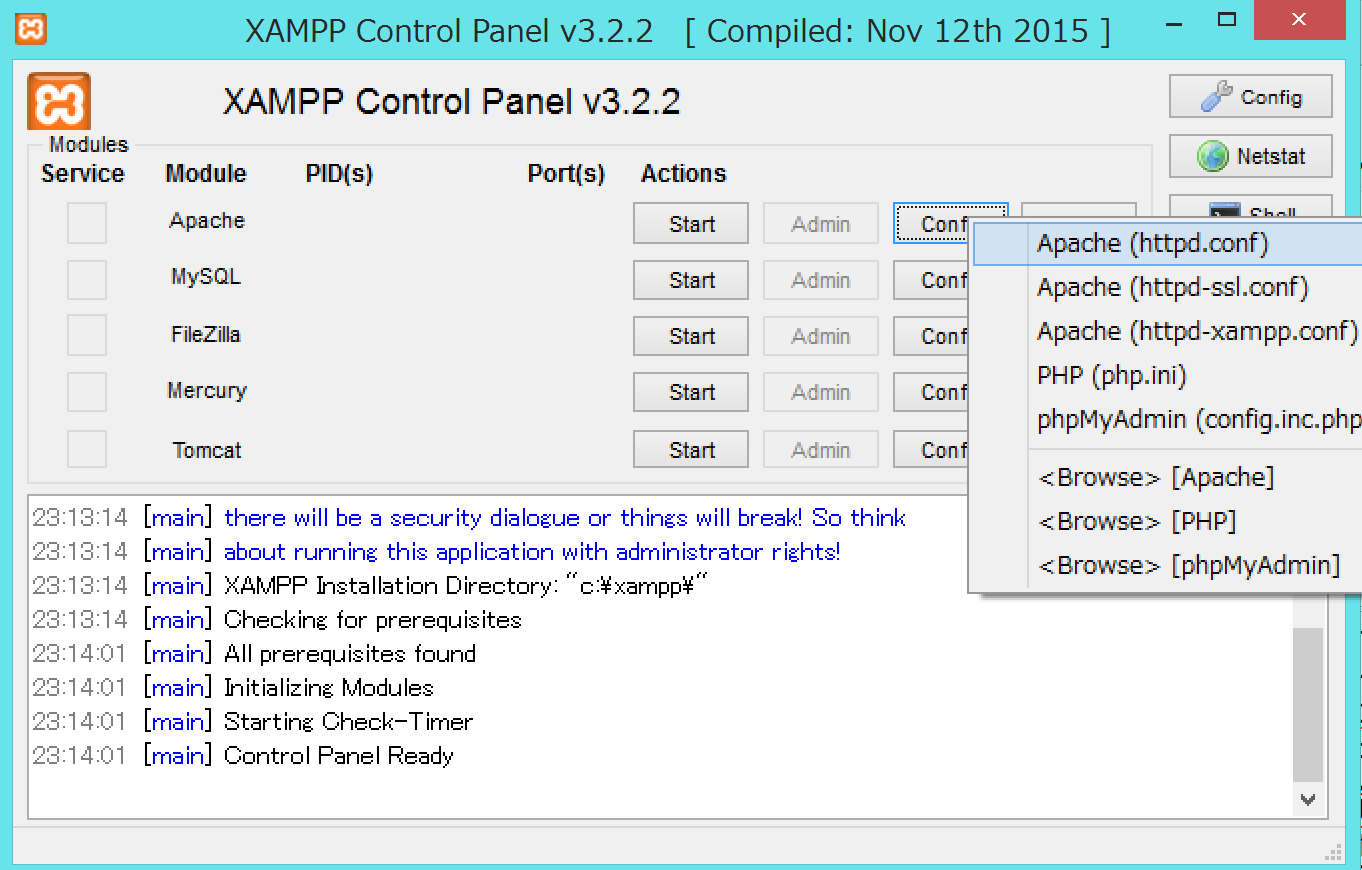
xamppの使い方
https://www.adminweb.jp/xampp/
phpの参考サイト
http://nn-hokuson.hatenablog.com/entry/2017/04/09/091148


