![[PukiWiki]](image/pukiwiki.png "[PukiWiki]")
横井?
ほぼ↓参考にした
https://centossrv.com/
稼働率、セキュリティ、速度、価格を考慮して選ぶ。
今回は、稼働率が高く、速度が速いほうがシステムとしては良好となるためオンプレミスを選択した。
HP ProLiant DL360p Gen8
CPU:6コア Intel E5-2630 2.3GHz×2
RAID:P420i Smart Array
HDD:1TB SFF SAS 7.2krpm×4
メモリー:64GB DDR3
NIC:1GbEポート×4
https://www.oki.com/jp/server/ifServer/catalog/dl380pgen8.html
OS選択の基準としては自分の必要な機能があるものはどれか、
サポートはいつまで続くのかを考えてその中で最良なものを選択する。
OSを開発しようとしない限りは安定版で最新のものを使っておけば問題はないであろう。
※各OSのリリース日とサポート終了日を表にまとめてみた
今回はCentOS7を例として手順を説明する。
(1)CentOSのダウンロードページからインストールディスクイメージ(CentOS-7-x86_64-Minimal-xxxx.iso)をダウンロードする。
(2)ダウンロードしたディスクイメージが破損していないかチェックするために使用するSHA256SUMをディスクイメージと同じフォルダにダウンロードする。
※SHA256SUMのダウンロードは、ブラウザがChromeの場合、リンク右クリックで「名前を付けてリンク先を保存」でダウンロードする
(3)ダウンロードしたディスクイメージが破損していないかチェックする。
コマンドプロンプトを起動し以下の3つのコマンドを実行する
cd C:\Users\xxxxxxxx\Downloads
certutil -hashfile CentOS-7-x86_64-Minimal-2009.iso SHA256
type sha256sum.txt | findstr Minimal
コマンド実行後以下の図のようになればよい。

(4)ダウンロードしたインストールディスクイメージをメディアへ書き込む。
ダウンロードしたディスクイメージを右クリック⇒「ディスク イメージの書き込み」または
「プログラムから開く」⇒「Windows ディスク イメージ書き込みツール」を選択してインストールディスクイメージをメディアへ書き込む。
※参考サイト
Windows 7/8.1/10でISO/IMGファイルをCD/DVD-Rに書き込む
CentOSのインストールディスクをディスクドライブにセットして再起動する。
※BIOSの設定で1番最初にディスクドライブからブートできるようになっている必要がある
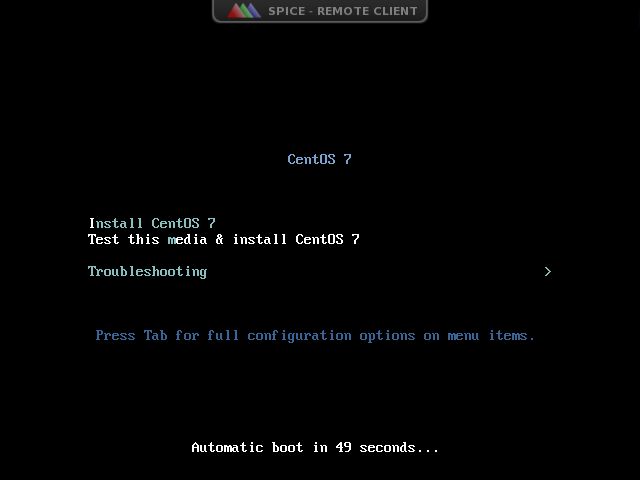
CentOSのインストール実行 空ENTER
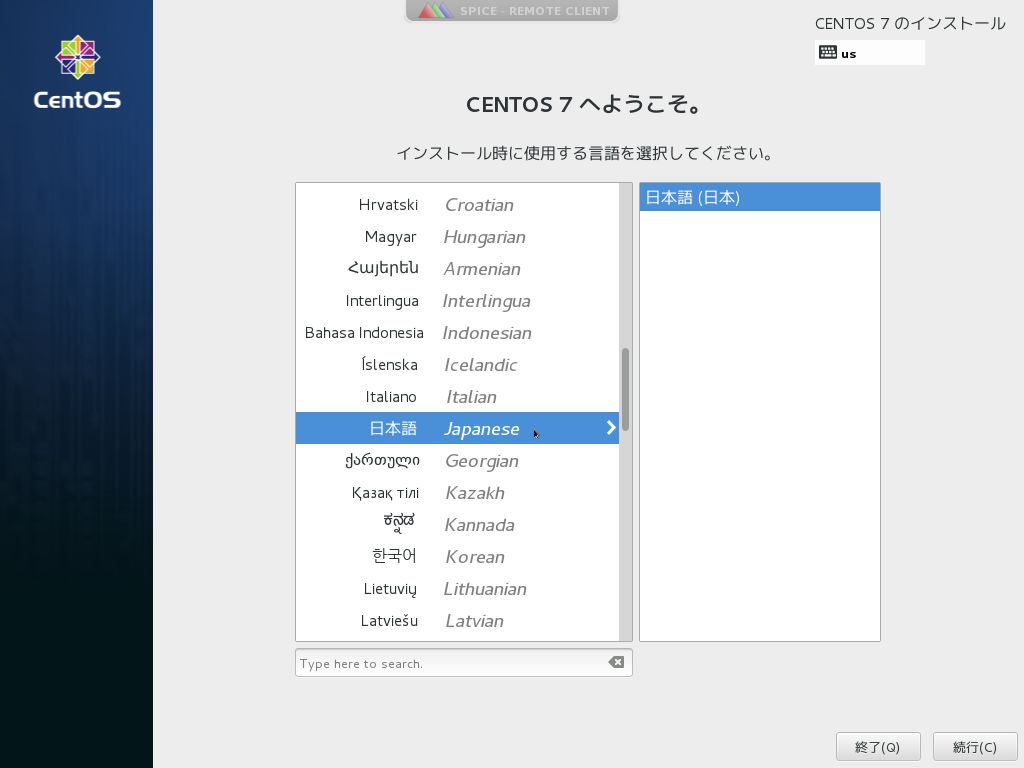
言語選択 「日本語」を選択して「続行」
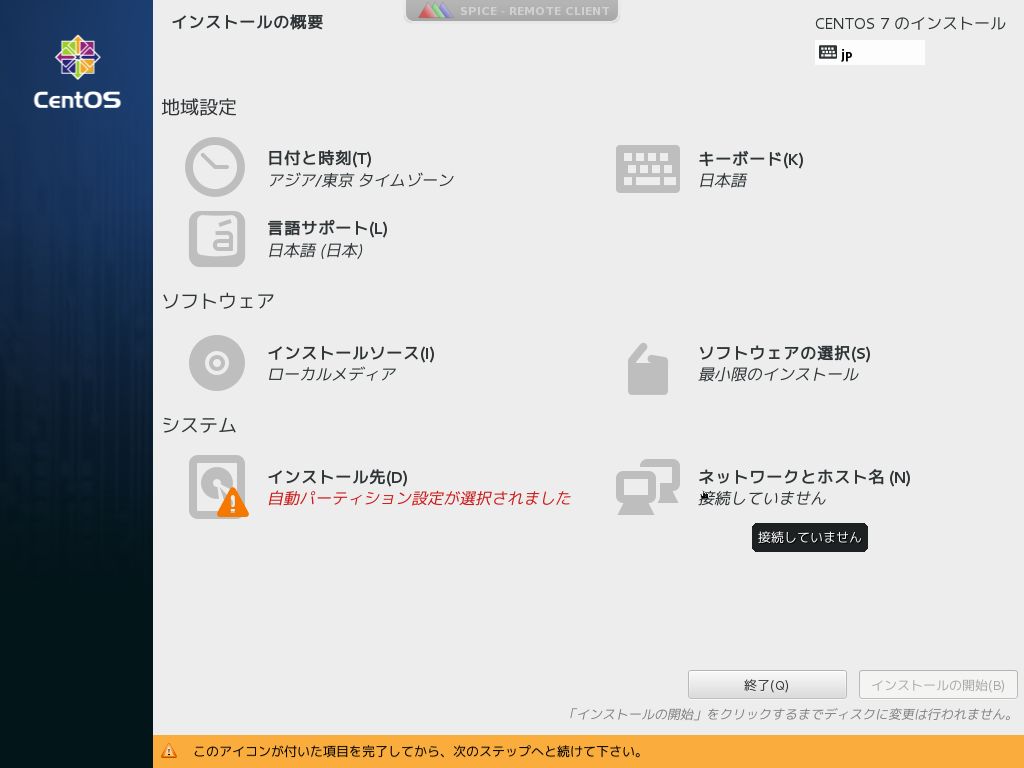
ネットワーク設定 「ネットワークとホスト名」
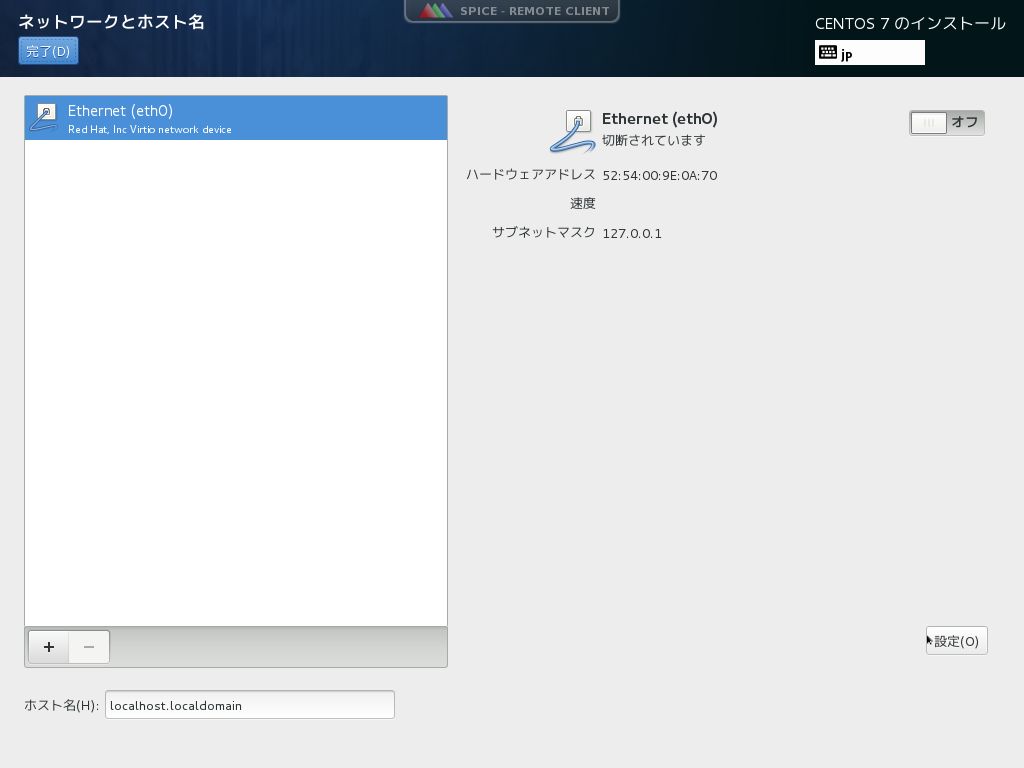
「設定」
「IPv4のセッティング」タブ
「方式」で「手動」を選択
「追加」ボタン
「アドレス」にサーバーのIPアドレス(例:133.55.115.240)を入力
「ネットマスク」にサーバーのネットマスク(例:22)を入力
「ゲートウェイ」にルーターのIPアドレス(例:133.55.112.1)を入力
「DNSサーバー」にルーターのIPアドレス(例:133.55.2.7)を入力
「保存」ボタン
「オン」 「ホスト名」にサーバーのホスト名(例:dic515s2.pu-toyama.ac.jp)を入力 「完了」ボタン
インストール先設定 「インストール先」
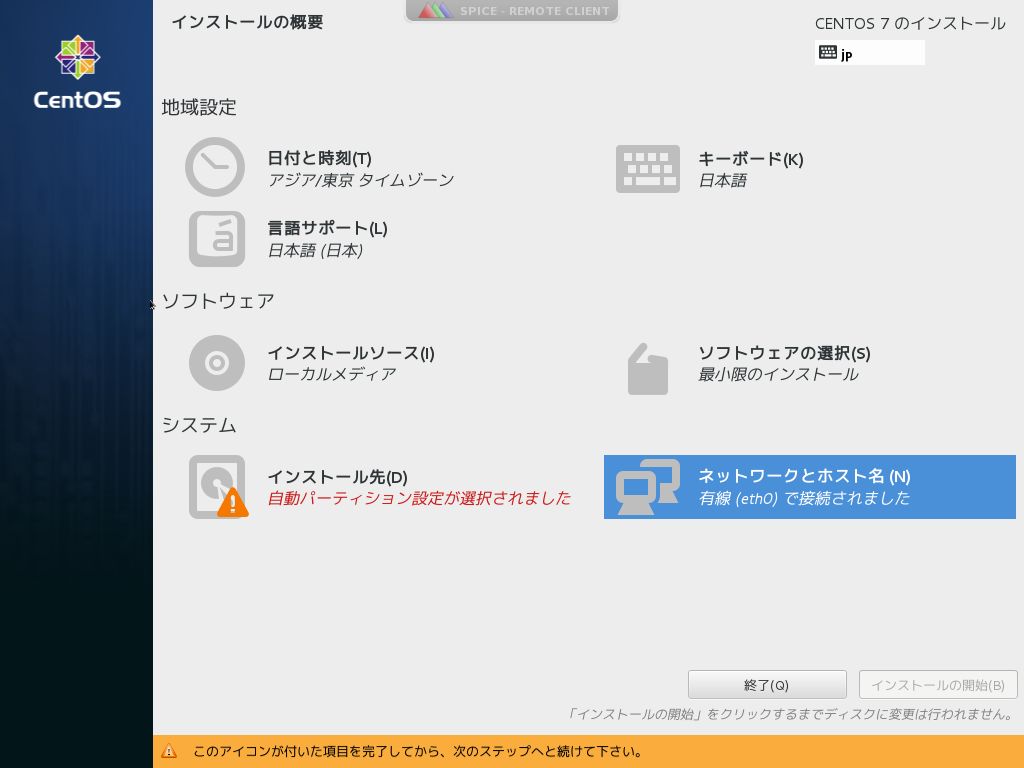
「完了」ボタン
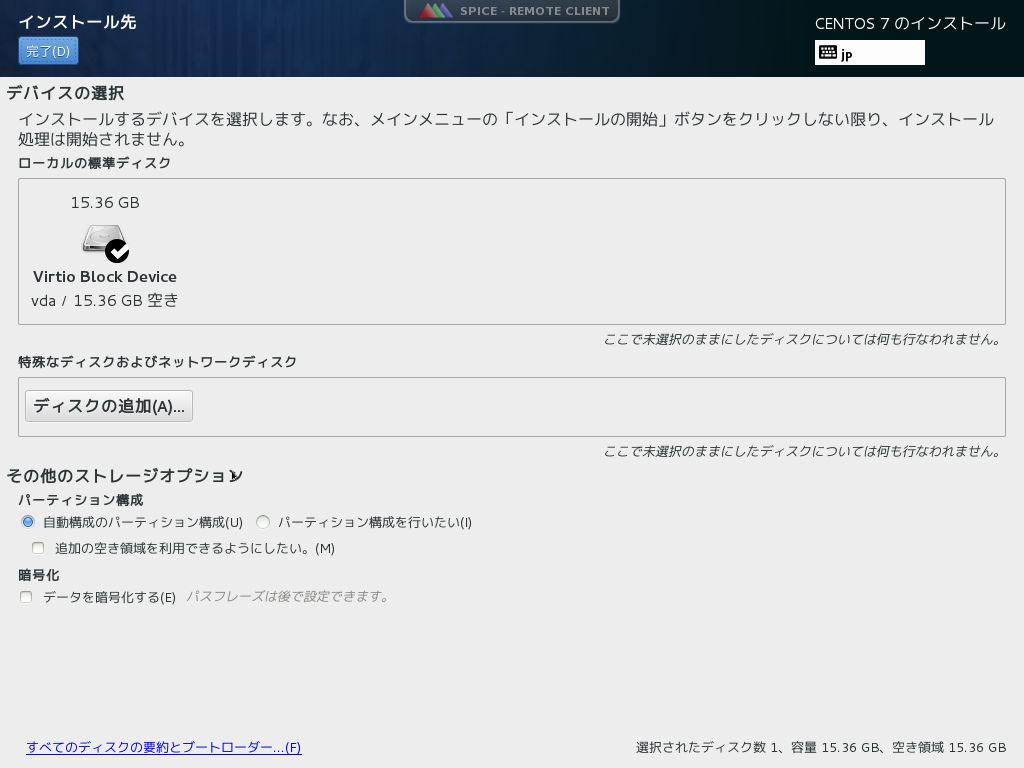
インストール開始 「インストールの開始」
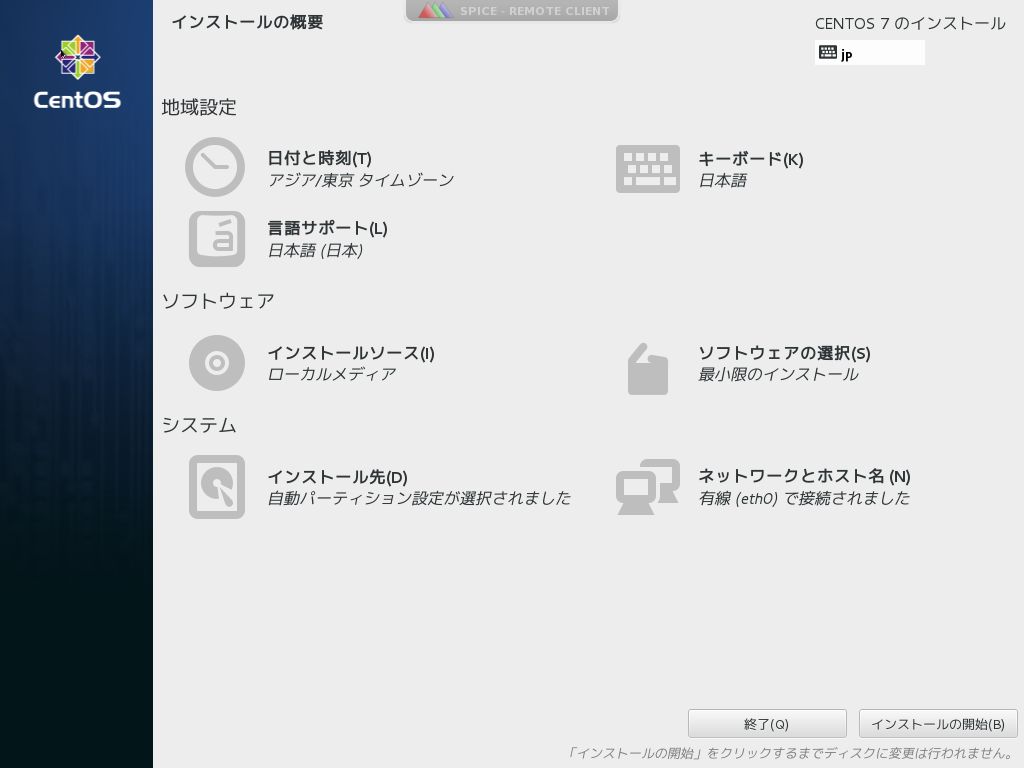
root(管理ユーザー)パスワード設定 「rootパスワード」
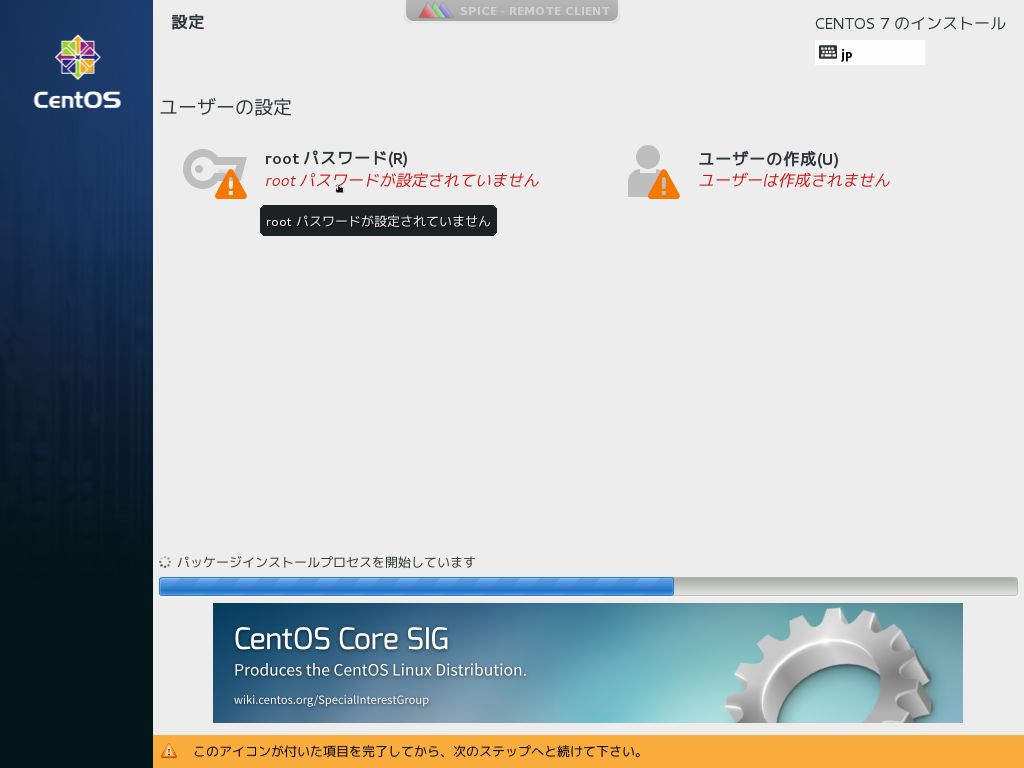
「rootパスワード」、「確認」にroot(管理ユーザー)パスワードを入力 「完了」ボタン
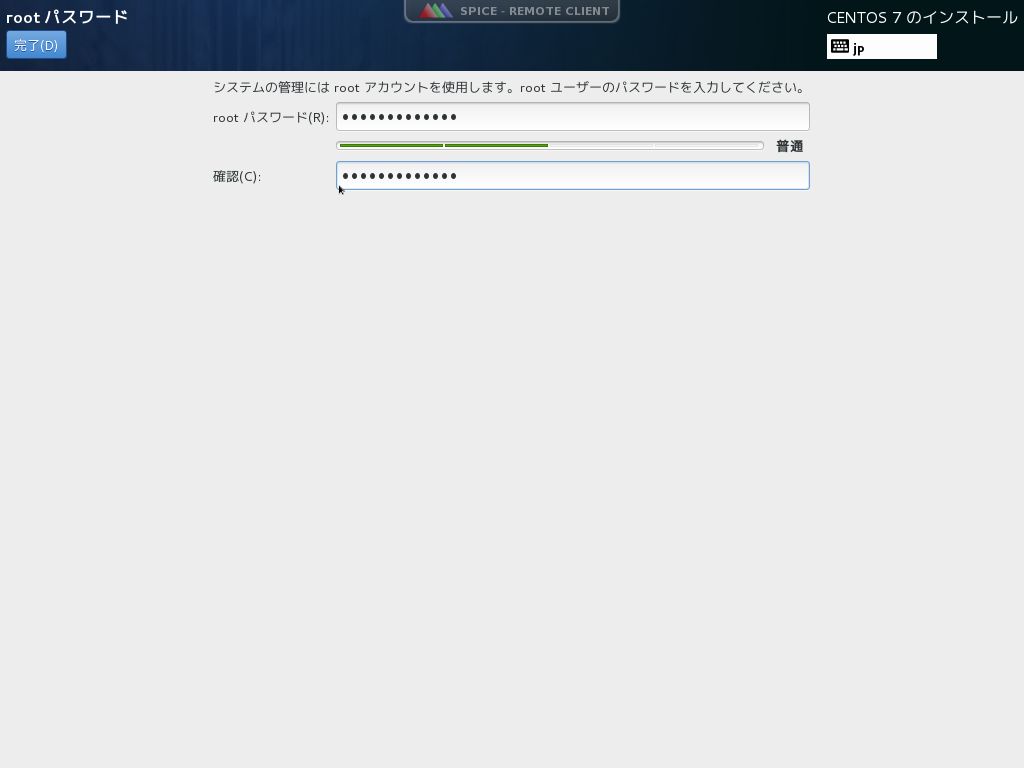
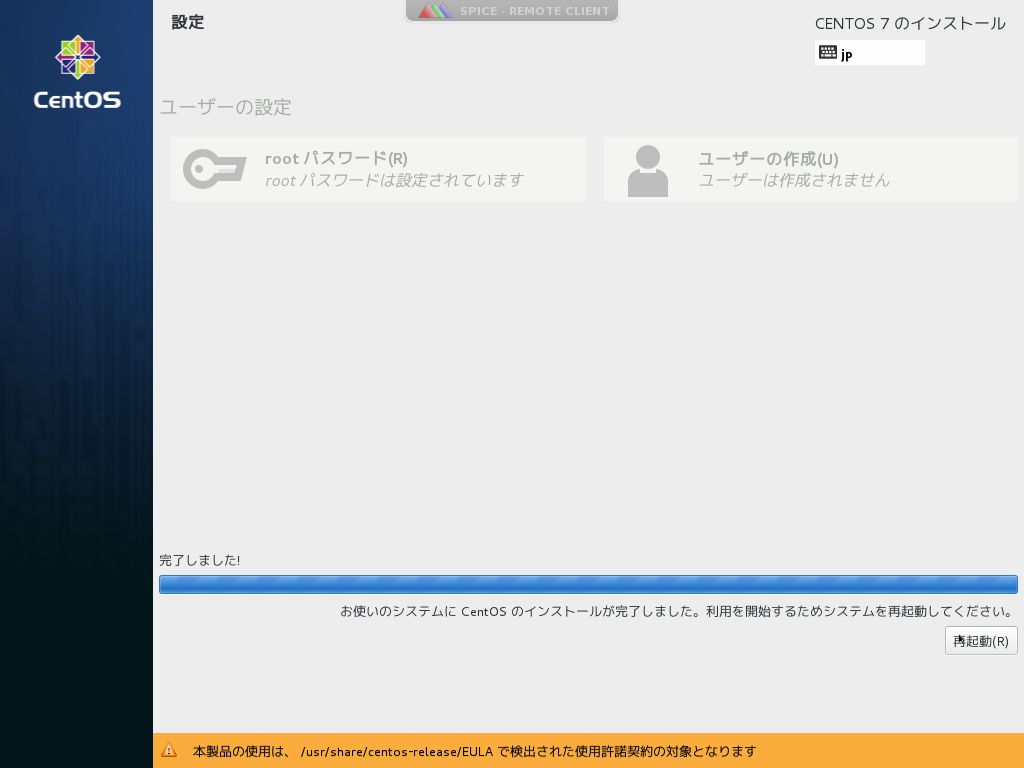
インストール完了 「再起動」
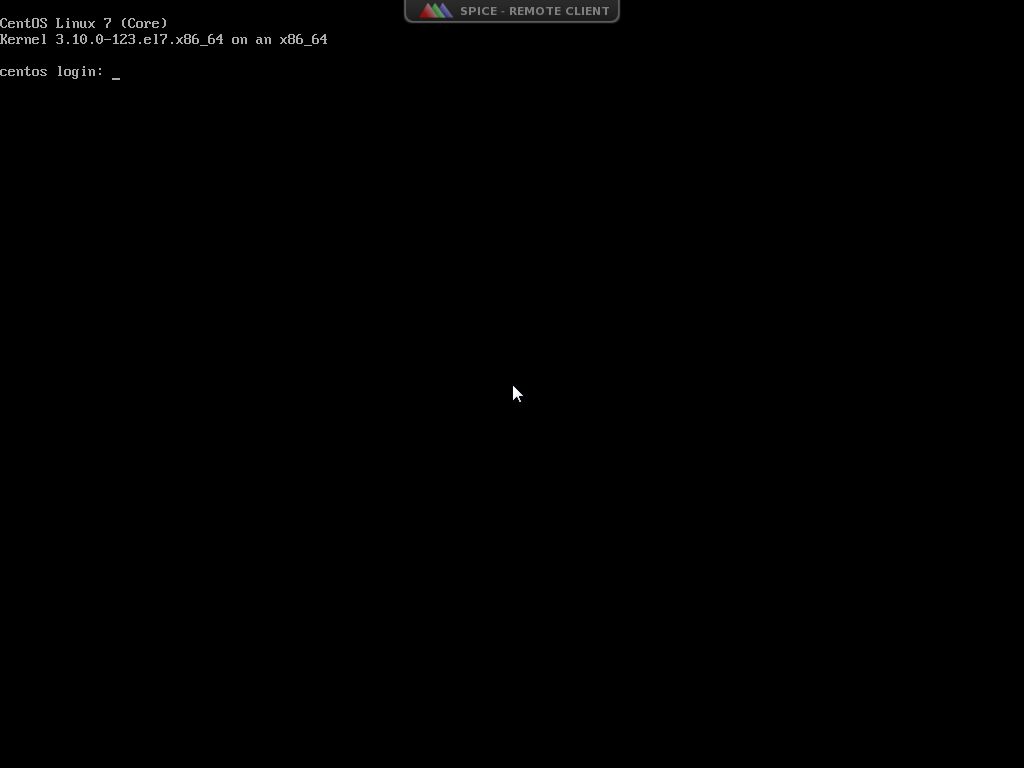
CentOS 7起動後の画面
例として、管理者用の一般ユーザー名をtpuとする
usermod -G wheel tpu
vi /etc/pam.d/su
#auth required pam_wheel.so use_uid
↓
auth required pam_wheel.so use_uid ← コメント解除
管理者用一般ユーザーからはrootになれて、管理者以外の一般ユーザーからはrootになれないことを確認
Linuxにおいて神であるrootでログインできるのは色々とマズいのでsshだと一般ユーザでログインするようにしましょう
rootログインを無効に
vim /etc/ssh/sshd_config
yesをnoに書き換える
PermitRootLogin yes
↓
PermitRootLogin no
sshdを再起動
systemctl restart sshd
RPMパッケージのインストール・アンインストールを行うyumの初期設定を行う
yum -y update
※大量のパッケージのダウンロード/アップデートを行うため時間がかかる
yum -y install yum-cron
vi /etc/yum/yum-cron.conf
# Whether updates should be applied when they are available.  Note
# that download_updates must also be yes for the update to be applied.
apply_updates = yes
systemctl start yum-cron
systemctl enable yum-cron
yum -y groupinstall base "Development tools"
システムからroot宛に重要なメールが送られてくるので、root宛メールを普段使用しているメールアドレス宛に転送するようにする
メールサーバーのOP25B対策(Postfix編)実施
sed -i '/^root:/d' /etc/aliases
echo "root: t955016@st.pu-toyama.ac.jp" >> /etc/aliases
newaliases
echo test|mail root
テストメールが転送先メールアドレス宛に届いていることを確認する
これを行うことで使えなかったサービスなどが使えるようになるらしい~(・・?)(本当かな?)
getenforce
Enforcing
setenforce 0
getenforce
Permissive
vi /etc/sysconfig/selinux
SELINUX=enforcing
↓
SELINUX=disabled
ルーターでブロックするためファイアウォールが不要な場合はファイアウォールを停止する
systemctl stop firewalld
systemctl disable firewalld
yum update
iusを使う epel(リポジトリ)が入ってなかったらepel入れる。
yum install https://dl.fedoraproject.org/pub/epel/epel-release-latest-7.noarch.rpm
必要なもの取得
yum --enablerepo=epel -y install nghttp2
yum -y install mailcap
yum install https://repo.ius.io/ius-release-el7.rpm
yum updateで自動でアップデートされないように、下記のファイルを修正。
vi /etc/yum.repos.d/ius.repo
enabled=0
初回は不要。2回目以降のアップデートでは、リポジトリのアップデートが必要なので
yum --disablerepo=base,extras,updates --enablerepo=ius,epel -y update
httpd停止・削除
systemctl stop httpd
yum remove httpd
yum remove httpd-tools
インストール
iusと一緒にepel追記しないと依存関係ファイルでエラーとなる。
yum --disablerepo=base,extras,updates --enablerepo=ius,epel install httpd
yum -y install openldap-devel expat-devel
yum --disablerepo=base,extras,updates --enablerepo=ius,epel install mod_ssl
yum --disablerepo=base,extras,updates --enablerepo=ius,epel install httpd-devel
エラーでたら
yum --disablerepo=base,extras,updates --enablerepo=ius,epel install httpd-devel --skip-broken
systemctl start httpd
systemctl enable httpd
cat /dev/null > /etc/httpd/conf.d/welcome.conf
cat /dev/null > /etc/httpd/conf.d/autoindex.conf
systemctl restart httpd.service
ssh導入方法(一応)
公開鍵認証方式関連の説明はあるが実行していない。
sudo yum install -y nkf --enablerepo=epel
■Tripwireインストール
yum -y install tripwire
tripwire-setup-keyfiles
----------------------------------------------
The Tripwire site and local passphrases are used to sign a  variety  of
files, such as the configuration, policy, and database files.

Passphrases should be at least 8 characters in length and contain  both
letters and numbers.

See the Tripwire manual for more information.

----------------------------------------------
Creating key files...

(When selecting a passphrase, keep in mind that good passphrases typically
have upper and lower case letters, digits and punctuation marks, and are
at least 8 characters in length.)

Enter the site keyfile passphrase: ここに入力したもの覚えとく
Verify the site keyfile passphrase: 確認入力
Generating key (this may take several minutes)...Key generation complete.

(When selecting a passphrase, keep in mind that good passphrases typically
have upper and lower case letters, digits and punctuation marks, and are
at least 8 characters in length.)

Enter the local keyfile passphrase: ここに入力したもの覚えとく
Verify the local keyfile passphrase: 確認入力
Generating key (this may take several minutes)...Key generation complete.

----------------------------------------------
Signing configuration file...
Please enter your site passphrase:
Wrote configuration file: /etc/tripwire/tw.cfg

A clear-text version of the Tripwire configuration file:
/etc/tripwire/twcfg.txt
has been preserved for your inspection.  It  is  recommended  that  you
move this file to a secure location and/or encrypt it in place (using a
tool such as GPG, for example) after you have examined it.

----------------------------------------------
Signing policy file...
Please enter your site passphrase:
Wrote policy file: /etc/tripwire/tw.pol

A clear-text version of the Tripwire policy file:
/etc/tripwire/twpol.txt
has been preserved for  your  inspection.  This  implements  a  minimal
policy, intended only to test  essential  Tripwire  functionality.  You
should edit the policy file to  describe  your  system,  and  then  use
twadmin to generate a new signed copy of the Tripwire policy.

Once you have a satisfactory Tripwire policy file, you should move  the
clear-text version to a secure location  and/or  encrypt  it  in  place
(using a tool such as GPG, for example).

Now run "tripwire --init" to enter Database Initialization  Mode.  This
reads the policy file, generates a database based on its contents,  and
then cryptographically signs the resulting  database.  Options  can  be
entered on the command line to specify which policy, configuration, and
key files are used  to  create  the  database.  The  filename  for  the
database can be specified as well. If no  options  are  specified,  the
default values from the current configuration file are used.
【追記】site keyfile passphraseを忘れてしまったとき
[root@localhost ~]# twadmin -m G -S /etc/tripwire/site.key
Enter the site keyfile passphrase:  ←さっきと同じものが出てくる
Verify the site keyfile passphrase: ←確認
Generating key (this may take several minutes)...Key generation complete.
■Tripwire設定
(1)Tripwire設定
vi /etc/tripwire/twcfg.txt
LOOSEDIRECTORYCHECKING =true
REPORTLEVEL   =4

twadmin -m F -c /etc/tripwire/tw.cfg -S /etc/tripwire/site.key /etc/tripwire/twcfg.txt
Please enter your site passphrase:
Wrote configuration file: /etc/tripwire/tw.cfg
rm -f /etc/tripwire/twcfg.txt
※Tripwire設定ファイル(テキスト版)を復元する場合
twadmin -m f -c /etc/tripwire/tw.cfg > /etc/tripwire/twcfg.txt
(2)ポリシーファイル設定
Tripwireは、ポリシーファイルを元に作成したデータベースと、現在のファイル状態を比較することにより、
ファイルが変更されたかどうかを検知するが、デフォルトのポリシーファイルでは存在しないファイルのチェックが有効になっていたり、
逆に存在するファイルのチェックが無効になっていたりするため、存在しないファイルのチェックを無効に、
存在するファイルのチェックを有効にするPerlスクリプトを作成して、ポリシーファイルを最適化する。
vi /etc/tripwire/twpolmake.pl
#!/usr/bin/perl
# Tripwire Policy File customize tool
# ----------------------------------------------------------------
# Copyright (C) 2003 Hiroaki Izumi
# This program is free software; you can redistribute it and/or
# modify it under the terms of the GNU General Public License
# as published by the Free Software Foundation; either version 2
# of the License, or (at your option) any later version.
# This program is distributed in the hope that it will be useful,
# but WITHOUT ANY WARRANTY; without even the implied warranty of
# MERCHANTABILITY or FITNESS FOR A PARTICULAR PURPOSE.  See the
# GNU General Public License for more details.
# You should have received a copy of the GNU General Public License
# along with this program; if not, write to the Free Software
# Foundation, Inc., 59 Temple Place - Suite 330, Boston, MA  02111-1307, USA.
# ----------------------------------------------------------------
# Usage:
#    perl twpolmake.pl {Pol file}
# ----------------------------------------------------------------
#
$POLFILE=$ARGV[0];

open(POL,"$POLFILE") or die "open error: $POLFILE" ;
my($myhost,$thost) ;
my($sharp,$tpath,$cond) ;
my($INRULE) = 0 ;

while (<POL>) {
   chomp;
   if (($thost) = /^HOSTNAME\s*=\s*(.*)\s*;/) {
       $myhost = `hostname` ; chomp($myhost) ;
       if ($thost ne $myhost) {
           $_="HOSTNAME=\"$myhost\";" ;
       }
   }
   elsif ( /^{/ ) {
       $INRULE=1 ;
   }
   elsif ( /^}/ ) {
       $INRULE=0 ;
   }
   elsif ($INRULE == 1 and ($sharp,$tpath,$cond) = /^(\s*\#?\s*)(\/\S+)\b(\s+->\s+.+)$/) {
       $ret = ($sharp =~ s/\#//g) ;
       if ($tpath eq '/sbin/e2fsadm' ) {
           $cond =~ s/;\s+(tune2fs.*)$/; \#$1/ ;
       }
       if (! -s $tpath) {
           $_ = "$sharp#$tpath$cond" if ($ret == 0) ;
       }
       else {
           $_ = "$sharp$tpath$cond" ;
       }
   }
   print "$_\n" ;
}
close(POL) ;
perl /etc/tripwire/twpolmake.pl /etc/tripwire/twpol.txt > /etc/tripwire/twpol.txt.new
echo ! "/var/lib/tripwire/`hostname`.twd ;" >> /etc/tripwire/twpol.txt.new
echo ! "/tmp/tripwire.log ;" >> /etc/tripwire/twpol.txt.new
twadmin -m P -c /etc/tripwire/tw.cfg -p /etc/tripwire/tw.pol -S /etc/tripwire/site.key /etc/tripwire/twpol.txt.new
Please enter your site passphrase:
Wrote policy file: /etc/tripwire/tw.pol
rm -f /etc/tripwire/twpol.txt*
※ポリシーファイル(テキスト版)を復元する場合
twadmin -m p -c /etc/tripwire/tw.cfg -p /etc/tripwire/tw.pol -S /etc/tripwire/site.key > /etc/tripwire/twpol.txt
(3)データベース作成
tripwire -m i -s -c /etc/tripwire/tw.cfg
Please enter your local passphrase:
■Tripwire確認
tripwire -m c -s -c /etc/tripwire/tw.cfg
Open Source Tripwire(R) 2.4.3.1 Integrity Check Report

Report generated by:          root
Report created on:            2017年01月26日 10時33分26秒
Database last updated on:     Never

===============================================================================
Report Summary:
===============================================================================

Host name:                    centos.centossrv.com
Host IP address:              xxx.xxx.xxx.xxx
Host ID:                      None
Policy file used:             /etc/tripwire/tw.pol
Configuration file used:      /etc/tripwire/tw.cfg
Database file used:           /var/lib/tripwire/centos.centossrv.com.twd
Command line used:            tripwire -m c -s -c /etc/tripwire/tw.cfg

===============================================================================
Rule Summary:
===============================================================================

-------------------------------------------------------------------------------
 Section: Unix File System
-------------------------------------------------------------------------------

 Rule Name                       Severity Level    Added    Removed  Modified
 ---------                       --------------    -----    -------  --------
 User binaries                   66                0        0        0
 Tripwire Binaries               100               0        0        0
 Libraries                       66                0        0        0
 Operating System Utilities      100               0        0        0
 File System and Disk Administraton Programs
                                 100               0        0        0
 Kernel Administration Programs  100               0        0        0
 Networking Programs             100               0        0        0
 System Administration Programs  100               0        0        0
 Hardware and Device Control Programs
                                 100               0        0        0
 System Information Programs     100               0        0        0
 Application Information Programs
                                 100               0        0        0
 (/sbin/rtmon)
 Critical Utility Sym-Links      100               0        0        0
 Shell Binaries                  100               0        0        0
 Critical system boot files      100               0        0        0
 Tripwire Data Files             100               0        0        0
 System boot changes             100               0        0        0
 OS executables and libraries    100               0        0        0
 Critical configuration files    100               0        0        0
 Security Control                100               0        0        0
 Login Scripts                   100               0        0        0
 Root config files               100               0        0        0
 Invariant Directories           66                0        0        0
 Temporary directories           33                0        0        0
 Critical devices                100               0        0        0
 (/proc/kcore)

Total objects scanned:  47479
Total violations found:  0

===============================================================================
Object Summary:
===============================================================================

-------------------------------------------------------------------------------
# Section: Unix File System
-------------------------------------------------------------------------------

No violations.

===============================================================================
Error Report:
===============================================================================

No Errors

-------------------------------------------------------------------------------
*** End of report ***

Open Source Tripwire 2.4 Portions copyright 2000 Tripwire, Inc. Tripwire is a registered
trademark of Tripwire, Inc. This software comes with ABSOLUTELY NO WARRANTY;
for details use --version. This is free software which may be redistributed
or modified only under certain conditions; see COPYING for details.
All rights reserved.
echo test > test.txt
tripwire -m c -s -c /etc/tripwire/tw.cfg
Open Source Tripwire(R) 2.4.3.1 Integrity Check Report

Report generated by:          root
Report created on:            2017年01月26日 10時37分34秒
Database last updated on:     Never

===============================================================================
Report Summary:
===============================================================================

Host name:                    centos.centossrv.com
Host IP address:              xxx.xxx.xxx.xxx
Host ID:                      None
Policy file used:             /etc/tripwire/tw.pol
Configuration file used:      /etc/tripwire/tw.cfg
Database file used:           /var/lib/tripwire/centos.centossrv.com.twd
Command line used:            tripwire -m c -s -c /etc/tripwire/tw.cfg

===============================================================================
Rule Summary:
===============================================================================

-------------------------------------------------------------------------------
 Section: Unix File System
-------------------------------------------------------------------------------

 Rule Name                       Severity Level    Added    Removed  Modified
 ---------                       --------------    -----    -------  --------
 User binaries                   66                0        0        0
 Tripwire Binaries               100               0        0        0
 Libraries                       66                0        0        0
 Operating System Utilities      100               0        0        0
 File System and Disk Administraton Programs
                                 100               0        0        0
 Kernel Administration Programs  100               0        0        0
 Networking Programs             100               0        0        0
 System Administration Programs  100               0        0        0
 Hardware and Device Control Programs
                                 100               0        0        0
 System Information Programs     100               0        0        0
 Application Information Programs
                                 100               0        0        0
 (/sbin/rtmon)
 Critical Utility Sym-Links      100               0        0        0
 Shell Binaries                  100               0        0        0
 Critical system boot files      100               0        0        0
 Tripwire Data Files             100               0        0        0
 System boot changes             100               0        0        0
 OS executables and libraries    100               0        0        0
 Critical configuration files    100               0        0        0
 Security Control                100               0        0        0
 Login Scripts                   100               0        0        0
*Root config files               100               1        0        0
 Invariant Directories           66                0        0        0
 Temporary directories           33                0        0        0
 Critical devices                100               0        0        0
 (/proc/kcore)

Total objects scanned:  47480
Total violations found:  1

===============================================================================
Object Summary:
===============================================================================

-------------------------------------------------------------------------------
# Section: Unix File System
-------------------------------------------------------------------------------

-------------------------------------------------------------------------------
Rule Name: Root config files (/root)
Severity Level: 100
-------------------------------------------------------------------------------

===============================================================================
Error Report:
===============================================================================

No Errors

-------------------------------------------------------------------------------
*** End of report ***

Open Source Tripwire 2.4 Portions copyright 2000 Tripwire, Inc. Tripwire is a registered
trademark of Tripwire, Inc. This software comes with ABSOLUTELY NO WARRANTY;
for details use --version. This is free software which may be redistributed
or modified only under certain conditions; see COPYING for details.
All rights reserved.
twprint -m r --report-level 1 -c /etc/tripwire/tw.cfg -r /var/lib/tripwire/report/centos.centossrv.com-20170123-184023.twr
【修正】20170123-184023の部分が異なっている可能性があるので、以下のディレクトリを確認する
[root@localhost ~]# cd /var/lib/tripwire/report
[root@localhost report]# ls
localhost.localdomain-20210303-183106.twr  localhost.localdomain-20210304-030001.twr
localhost.localdomain-20210303-183335.twr
この例では3つ出てきた
一番新しい期日の番号に書き換える
[root@localhost ~]# twprint -m r --report-level 1 -c /etc/tripwire/tw.cfg -r /var/lib/tripwire/report/localhost.localdomain-20210304-030001.twr
Note: Report is not encrypted.
Added:  "/root/test.txt"
rm -f test.txt ← テストファイル削除(後始末)
■Tripwire定期自動実行設定
yum -y install tmpwatch ← tmpwatchインストール
vi tripwire.sh ← Tripwire定期自動実行スクリプト作成
#!/bin/bash

# 既存のTripwire定期自動実行設定削除
rm -f /etc/cron.daily/tripwire-check

# パスフレーズ設定
LOCALPASS=xxxxxxxx # ローカルパスフレーズ
SITEPASS=xxxxxxxx  # サイトパスフレーズ

TRIPWIRE=/usr/sbin/tripwire
TWADMIN=/usr/sbin/twadmin
TWPRINT=/usr/sbin/twprint
cd /etc/tripwire

# Tripwireチェック実行
# ※ファイル変更を検知した場合のみroot宛にサマリをメールする
rm -f /var/lib/tripwire/report/`hostname`-`date +%Y%m%d`-*.twr
${TRIPWIRE} -m c -s -c tw.cfg > /tmp/tripwire.log
if [ $(grep "Total violations found" /tmp/tripwire.log | awk '{print $4}') -ne 0 ]; then
   ${TWPRINT} -m r --report-level 1 -c tw.cfg -r /var/lib/tripwire/report/`hostname`-`date +%Y%m%d`-*.twr | \
   mail -s "Tripwire Integrity Check Report from `hostname`" root
fi

# Tripwireチェック実行結果(過去分)削除
# ※過去90日分保管
tmpwatch -m 2160 /var/lib/tripwire/report

# ポリシーファイル最新化
${TWADMIN} -m p -c tw.cfg -p tw.pol -S site.key > twpol.txt
perl twpolmake.pl twpol.txt > twpol.txt.new
${TWADMIN} -m P -c tw.cfg -p tw.pol -S site.key -Q $SITEPASS twpol.txt.new > /dev/null
rm -f twpol.txt* *.bak

# データベース最新化
rm -f /var/lib/tripwire/*.twd*
${TRIPWIRE} -m i -s -c tw.cfg -P $LOCALPASS
chmod 700 tripwire.sh ← Tripwire定期自動実行スクリプトへ実行権限付加
echo "0 3 * * * root /root/tripwire.sh" > /etc/cron.d/tripwire ← Tripwire定期自動実行設定追加※毎日3:00にTripwire定期実行スクリプトを実行する
■ポリシーファイルメンテナンス 日々のチェック結果より、あらかじめ変更がわかっているディレクトリやファイルについては検知されないようにする。
twadmin -m p -c /etc/tripwire/tw.cfg -p /etc/tripwire/tw.pol -S /etc/tripwire/site.key > /etc/tripwire/twpol.txt ← ポリシーファイル(テキスト版)作成
echo '!/var/log/sa ;' >> /etc/tripwire/twpol.txt ← 例としてディレクトリ/var/log/saをチェック対象外にする
echo '!/etc/sysconfig/iptables ;' >> /etc/tripwire/twpol.txt ← 例としてファイル/etc/sysconfig/iptablesをチェック対象外にする
twadmin -m P -c /etc/tripwire/tw.cfg -p /etc/tripwire/tw.pol -S /etc/tripwire/site.key /etc/tripwire/twpol.txt ← 最適化済ポリシーファイルを元にポリシーファイル(暗号署名版)作成
Please enter your site passphrase: ← サイトパスフレーズ応答
Wrote policy file: /etc/tripwire/tw.pol
rm -f /etc/tripwire/twpol.txt /etc/tripwire/tw.pol.bak ← ポリシーファイル(テキスト版&バックアップ)削除
rm -f /var/lib/tripwire/*.twd* ; tripwire -m i -s -c /etc/tripwire/tw.cfg ← Tripwireデータベース更新
Please enter your local passphrase: ← ローカルパスフレーズ応答
■概要
chkrootkitというrootkit検知ツールを導入して、rootkitがLinuxサーバーにインストールされてしまっていないかチェックする。
chkrootkitは、以下のコマンドを使用してチェックするため、
コマンド自体がrootkitを検知できないように改竄されてからでは意味がないので、
Linuxインストール後の初期の段階で導入しておくのが望ましい。
【chkrootkitが使用するコマンド】
awk, cut, echo, egrep, find, head, id, ls, netstat, ps, strings, sed, uname
なお、chkrootkitが検知できるのは既知のrootkitのみであり、新たなrootkitの検知はできない。
また、rootkitが設置されていないにもかかわらず、chkrootkitが誤ってrootkitを検知したとアラームをあげる場合もあるので、
chkrootkitによるrootkitの検知結果は参考程度としておく。
■chkrootkitインストール
【CentOS7の場合】
wget ftp://ftp.pangeia.com.br/pub/seg/pac/chkrootkit.tar.gz ← chkrootkitダウンロード
tar zxvf chkrootkit.tar.gz ← chkrootkit展開
mkdir -p ~/bin && mv chkrootkit-0.50/chkrootkit ~/bin ← chkrootkitを移動
rm -rf chkrootkit-0.50/ ← chkrootkit展開先ディレクトリを削除
rm -f chkrootkit.tar.gz ← ダウンロードしたchkrootkitを削除
■chkrootkit確認
chkrootkit | grep INFECTED ← chkrootkit実行
上記chkrootkit実行結果として"INFECTED"という行が表示されなければ問題なし
【追記】"INFECTED"が表示される場合
例)
[root@localhost ~]# chkrootkit | grep INFECTED
/root/bin/chkrootkit: 1480 行: [: : 整数の式が予期されます
Searching for Linux.Xor.DDoS ... INFECTED: Possible Malicious Linux.Xor.DDoS
installed
以下のコマンドで"INFECTED"が出ているファイルを見つける
[root@localhost ~]# chkrootkit
ROOTDIR is `/'
Checking `amd'... not found
Checking `basename'... not infected
Checking `biff'... not found
Checking `chfn'... not infected
Checking `chsh'... /root/bin/chkrootkit: 1480 行: [: : 整数の式が予期されます
not infected
Checking `cron'... not infected
Checking `crontab'... not infected
Checking `date'... not infected
Checking `du'... not infected
・
・
・
Searching for Linux.Xor.DDoS ... INFECTED: Possible Malicious Linux.Xor.DDoS installed     ←発見
/tmp/ks-script-CMs8jY
・
・
・
Checking `slapper'... not infected
Checking `z2'... not tested: can't exec ./chklastlog
Checking `chkutmp'... not tested: can't exec ./chkutmp
Checking `OSX_RSPLUG'... not tested
[root@localhost ~]# cd /tmp/ks-script-CMs8jY
-bash: cd: /tmp/ks-script-CMs8jY: ディレクトリではありません
ファイルということが分かる
※普通は"INFECTED"にならないはずなので、誤検知だと考える
そのファイルのディレクトリまで行って実行権限を消す
[root@localhost tmp]# chmod -x ks-script-CMs8jY
[root@localhost tmp]# chkrootkit | grep INFECTED
/root/bin/chkrootkit: 1480 行: [: : 整数の式が予期されます
"INFECTED"が出なくなった
■chkrootkit定期自動実行設定
vi /etc/cron.daily/chkrootkit ← chkrootkit実行スクリプトを毎日自動実行されるディレクトリへ作成
#!/bin/bash

PATH=/usr/bin:/bin:/root/bin

LOG=/tmp/$(basename ${0})

# chkrootkit実行
chkrootkit > $LOG 2>&1

# ログ出力
cat $LOG | logger -t $(basename ${0})

# SMTPSのbindshell誤検知対応
if [ ! -z "$(grep 465 $LOG)" ] && \
  [ -z $(/usr/sbin/lsof -i:465|grep bindshell) ]; then
       sed -i '/465/d' $LOG
fi

# upstartパッケージ更新時のSuckit誤検知対応
if [ ! -z "$(grep Suckit $LOG)" ] && \
  [ -z "$(rpm -V `rpm -qf /sbin/init`)" ]; then
       sed -i '/Suckit/d' $LOG
fi

# rootkit検知時のみroot宛メール送信
[ ! -z "$(grep INFECTED $LOG)" ] && \
grep INFECTED $LOG | mail -s "chkrootkit report in `hostname`" root
chmod 700 /etc/cron.daily/chkrootkit ← chkrootkit実行スクリプトへ実行権限付加
これで毎日定期的にrootkitがインストールされていないかチェックされ、
インストールされていた場合はroot宛にメールが届くようになる。
また、chkrootkitの実行結果は/var/log/messagesに保存される。
■chkrootkitで使用する安全なコマンドの確保
chkrootkitが使用するコマンド群が既に改竄されていた場合、
rootkitを正常に検出できなくなるので、
chkrootkitが使用するコマンド群をコピーしておき、
必要な場合にはそのコマンド群を使用してchkrootkitを実行する。
mkdir chkrootkitcmd ← chkrootkit使用コマンド退避先ディレクトリ作成
cp `which --skip-alias awk cut echo egrep find head id ls netstat ps strings sed ssh uname` chkrootkitcmd/ ← chkrootkit使用コマンドを退避先ディレクトリへコピー
chkrootkit -p /root/chkrootkitcmd|grep INFECTED ← 試しに退避したchkrootkit使用コマンドを使用してchkrootkit実行
zip -r chkrootkitcmd.zip chkrootkitcmd/ && rm -rf chkrootkitcmd ← chkrootkit使用コマンド退避先ディレクトリを圧縮して削除
echo|mail -a chkrootkitcmd.zip -s chkrootkitcmd.zip root ← chkrootkit使用コマンド(圧縮版)をroot宛にメール送信
rm -f chkrootkitcmd.zip ← chkrootkit使用コマンド(圧縮版)削除
■概要
Linux用のフリーのアンチウイルスソフトであるClam AntiVirusを導入する。
■Clam AntiVirusインストール
EPELリポジトリ導入(EPEL)を参照してEPELリポジトリを導入する
[root@centos ~]# yum -y install clamav clamav-server-systemd clamav-update clamav-scanner-systemd ← Clam AntiVirusインストール
■ウイルス定義ファイル最新化 [root@centos ~]# vi /etc/freshclam.conf ← ウイルス定義ファイル更新設定ファイル編集
# Comment or remove the line below.
#Example ← 行頭に#を追加してコメントアウト(ウイルス定義ファイル更新機能の有効化)
# Send the RELOAD command to clamd.
# Default: no
#NotifyClamd /path/to/clamd.conf NotifyClamd /etc/clamd.d/scan.conf ← 追加(ウイルス定義ファイル更新をclamdに通知する)
[root@centos ~]# vi /etc/sysconfig/freshclam ← ウイルス定義ファイル自動更新設定ファイル編集
#FRESHCLAM_DELAY= ← 行頭に#を追加してコメントアウト
[root@centos ~]# freshclam ← ウイルス定義ファイル最新化 ClamAV update process started at Sat Sep 3 13:22:28 2016 main.cvd is up to date (version: 57, sigs: 4218790, f-level: 60, builder: amishhammer) nonblock_connect: connect timing out (30 secs) Can't connect to port 80 of host database.clamav.net (IP: 172.110.204.67) Trying host database.clamav.net (208.72.56.53)... connect_error: getsockopt(SO_ERROR): fd=4 error=111: Connection refused Can't connect to port 80 of host database.clamav.net (IP: 208.72.56.53) Trying host database.clamav.net (64.22.33.90)... WARNING: getfile: daily-21724.cdiff not found on database.clamav.net (IP: 64.22.33.90) WARNING: getpatch: Can't download daily-21724.cdiff from database.clamav.net WARNING: getfile: daily-21724.cdiff not found on database.clamav.net (IP: 150.214.142.197) WARNING: getpatch: Can't download daily-21724.cdiff from database.clamav.net WARNING: getfile: daily-21724.cdiff not found on database.clamav.net (IP: 194.186.47.19) WARNING: getpatch: Can't download daily-21724.cdiff from database.clamav.net WARNING: Incremental update failed, trying to download daily.cvd Downloading daily.cvd [100%] daily.cvd updated (version: 22176, sigs: 575124, f-level: 63, builder: neo) Downloading bytecode-279.cdiff [100%] Downloading bytecode-280.cdiff [100%] Downloading bytecode-281.cdiff [100%] Downloading bytecode-282.cdiff [100%] Downloading bytecode-283.cdiff [100%] bytecode.cld updated (version: 283, sigs: 53, f-level: 63, builder: neo) Database updated (4793967 signatures) from database.clamav.net (IP: 69.12.162.28) ERROR: Please edit the example config file /etc/clamd.d/scan.conf ERROR: NotifyClamd: Can't find or parse configuration file /etc/clamd.d/scan.conf ※以後のウイルス定義ファイルのアップデートは、/etc/cron.d/clamav-updateにより定期的に自動で行われる
■Clam AntiVirus設定 [root@centos ~]# vi /etc/clamd.d/scan.conf ← Clam AntiVirus設定ファイル編集
# Comment or remove the line below.
#Example ← 行頭に#を追加してコメントアウト
# Run as another user (clamd must be started by root for this option to work)
# Default: don't drop privileges
#User clamscan ← 行頭に#を追加してコメントアウト(root権限で動作するようにする)
# Path to a local socket file the daemon will listen on.
# Default: disabled (must be specified by a user)
LocalSocket /var/run/clamd.scan/clamd.sock ← 行頭の#を削除
■Clam AntiVirus起動 [root@centos ~]# systemctl start clamd@scan ← clamd起動
※※clamd起動が以下のメッセージを出力して失敗する場合の対処(ここから)※※ Job for clamd@scan.service failed because a timeout was exceeded. See "systemctl status clamd@scan.service" and "journalctl -xe" for details.
[root@centos ~]# vi /lib/systemd/system/clamd@.service ← clamd起動スクリプト修正 [Service] Type = forking ExecStart = /usr/sbin/clamd -c /etc/clamd.d/%i.conf Restart = on-failure TimeoutSec=5min ← 追加(起動完了までに待機する時間を5分に設定)
[root@centos ~]# systemctl daemon-reload ← clamd起動スクリプト修正反映
[root@centos ~]# systemctl start clamd@scan ← clamd起動 ※※clamd起動が以下のメッセージを出力して失敗する場合の対処(ここまで)※※
[root@centos ~]# systemctl enable clamd@scan ← clamd自動起動設定
■ウイルススキャンテスト [root@centos ~]# clamdscan -c /etc/clamd.d/scan.conf --remove ← ウイルススキャンテスト(ウイルスなしの場合) /root: OK
Infected files: 0 ← ウイルスは検知されなかった Time: 1.924 sec (0 m 1 s)
[root@centos ~]# wget http://www.eicar.org/download/eicar.com ← テスト用ウイルスをダウンロード [root@centos ~]# wget http://www.eicar.org/download/eicar.com.txt ← 〃 [root@centos ~]# wget http://www.eicar.org/download/eicar_com.zip ← 〃 [root@centos ~]# wget http://www.eicar.org/download/eicarcom2.zip ← 〃
[root@centos ~]# clamdscan -c /etc/clamd.d/scan.conf --remove ← ウイルススキャンテスト(ウイルスありの場合) /root/eicar.com: Eicar-Test-Signature FOUND ← ウイルス検知 /root/eicar.com: Removed. ← ウイルス削除 /root/eicar.com.txt: Eicar-Test-Signature FOUND ← ウイルス検知 /root/eicar.com.txt: Removed. ← ウイルス削除 /root/eicar_com.zip: Eicar-Test-Signature FOUND ← ウイルス検知 /root/eicar_com.zip: Removed. ← ウイルス削除 /root/eicarcom2.zip: Eicar-Test-Signature FOUND ← ウイルス検知 /root/eicarcom2.zip: Removed. ← ウイルス削除
Infected files: 4 ← 4つのウイルスを検知した Time: 23.913 sec (0 m 23 s)
■ウイルススキャン定期自動実行設定 (1)ウイルススキャン定期自動実行設定 [root@centos ~]# vi /etc/cron.daily/clamdscan ← ウイルススキャン日次実行スクリプト作成
#!/bin/bash
# 設定ファイル CONFIG=/etc/clamd.d/scan.conf
# スキャン実行
# ※ウイルス検知時は隔離ディレクトリへ隔離 CLAMSCANLOG=`mktemp` QUARANTINEDIR=/tmp/clamdscan-quarantinedir-$(date +%Y%m%d) mkdir -p ${QUARANTINEDIR} clamdscan -c ${CONFIG} --move=${QUARANTINEDIR} / > ${CLAMSCANLOG} 2>&1
# ウイルス検知時のみroot宛にメール通知 if [ -z "$(grep FOUND$ ${CLAMSCANLOG})" ]; then
rm -rf ${QUARANTINEDIR}
else
grep -A 1 FOUND$ ${CLAMSCANLOG} | mail -s "Virus Found in `hostname` => ${QUARANTINEDIR}" root
fi
# スキャンログをシスログに出力 cat ${CLAMSCANLOG} | logger -t $(basename ${0}) rm -f ${CLAMSCANLOG}
[root@centos ~]# chmod +x /etc/cron.daily/clamdscan ← ウイルススキャン日次実行スクリプトへ実行権限付加
[root@centos ~]# echo ExcludePath ^/tmp/clamdscan-quarantinedir-.*/ >> /etc/clamd.d/scan.conf ← ウイルス隔離ディレクトリをスキャン対象外にする
[root@centos ~]# echo ExcludePath ^/proc/ >> /etc/clamd.d/scan.conf ← 例として/procディレクトリをスキャン対象外にする
[root@centos ~]# echo ExcludePath ^/sys/ >> /etc/clamd.d/scan.conf ← 例として/sysディレクトリをスキャン対象外にする
[root@centos ~]# systemctl restart clamd@scan ← clamd再起動(スキャン除外設定反映) これで、毎日定期的に全ファイルのウイルススキャンが行われ、ウイルスを検知した場合のみroot宛にメールが送られてくるようになる。
(2)ウイルス検知後の対応 ウイルス検知メールが送られてきた場合、内容を確認し、ウイルスであると確認できた場合、当該ファイルを隔離先(ウイルス検知メール件名に記載)から削除する。 ウイルスでない(ClamAVによる誤検知)と確認できた場合、当該ファイルを隔離先から復元し、次回以降、誤検知しないように当該ファイルをスキャン対象外にする。
計算機センターのメールアドレスにこの書類を送ることでポートを開放できる。年度ごとに必要。
■概要 Linuxサーバー上にファイアウォールを構築する。 ここでは、Linuxのパケットフィルタリング機能であるiptablesを使用して、Web等外部に公開するサービス以外のポートへのアクセスをブロックするようにする。
※通常はルーター側にもファイアウォール機能があるため、Linuxサーバー上でファイアウォールを構築後にポートを開放する場合は、ルーター側とLinuxサーバー側の2箇所でポート開放を行う必要があることに注意
【想定するネットワーク環境】
■iptables設定 (1)iptables設定 [root@centos ~]# yum -y install iptables-services ← iptables-servicesインストール※CentOS7の場合
[root@centos ~]# vi iptables.sh ← ファイアウォール設定スクリプト作成
#!/bin/bash
#---------------------------------------#
# 設定開始 #
#---------------------------------------#
# 内部ネットワークアドレス定義 LOCALNET=192.168.1.0/24
#---------------------------------------#
# 設定終了 #
#---------------------------------------#
# デフォルトルール(以降のルールにマッチしなかった場合に適用するルール)設定 IPTABLES_CONFIG=`mktemp` echo "*filter" >> $IPTABLES_CONFIG echo ":INPUT DROP [0:0]" >> $IPTABLES_CONFIG # 受信はすべて破棄 echo ":FORWARD DROP [0:0]" >> $IPTABLES_CONFIG # 通過はすべて破棄 echo ":OUTPUT ACCEPT [0:0]" >> $IPTABLES_CONFIG # 送信はすべて許可 echo ":ACCEPT_COUNTRY - [0:0]" >> $IPTABLES_CONFIG # 指定した国からのアクセスを許可 echo ":DROP_COUNTRY - [0:0]" >> $IPTABLES_CONFIG # 指定した国からのアクセスを破棄 echo ":LOG_PINGDEATH - [0:0]" >> $IPTABLES_CONFIG # Ping of Death攻撃はログを記録して破棄
# 自ホストからのアクセスをすべて許可 echo "-A INPUT -i lo -j ACCEPT" >> $IPTABLES_CONFIG
# 内部からのアクセスをすべて許可 echo "-A INPUT -s $LOCALNET -j ACCEPT" >> $IPTABLES_CONFIG
# 内部から行ったアクセスに対する外部からの返答アクセスを許可 echo "-A INPUT -m state --state RELATED,ESTABLISHED -j ACCEPT" >> $IPTABLES_CONFIG
# SYN Cookiesを有効にする
# ※TCP SYN Flood攻撃対策 sysctl -w net.ipv4.tcp_syncookies=1 > /dev/null sed -i '/net.ipv4.tcp_syncookies/d' /etc/sysctl.conf echo "net.ipv4.tcp_syncookies=1" >> /etc/sysctl.conf
# ブロードキャストアドレス宛pingには応答しない
# ※Smurf攻撃対策 sysctl -w net.ipv4.icmp_echo_ignore_broadcasts=1 > /dev/null sed -i '/net.ipv4.icmp_echo_ignore_broadcasts/d' /etc/sysctl.conf echo "net.ipv4.icmp_echo_ignore_broadcasts=1" >> /etc/sysctl.conf
# ICMP Redirectパケットは拒否 sed -i '/net.ipv4.conf.*.accept_redirects/d' /etc/sysctl.conf for dev in `ls /proc/sys/net/ipv4/conf/` do
   sysctl -w net.ipv4.conf.$dev.accept_redirects=0 > /dev/null
   echo "net.ipv4.conf.$dev.accept_redirects=0" >> /etc/sysctl.conf
done
# Source Routedパケットは拒否 sed -i '/net.ipv4.conf.*.accept_source_route/d' /etc/sysctl.conf for dev in `ls /proc/sys/net/ipv4/conf/` do
   sysctl -w net.ipv4.conf.$dev.accept_source_route=0 > /dev/null
   echo "net.ipv4.conf.$dev.accept_source_route=0" >> /etc/sysctl.conf
done
# フラグメント化されたパケットはログを記録して破棄 echo "-A INPUT -f -j LOG --log-prefix \"[IPTABLES FRAGMENT] : \"" >> $IPTABLES_CONFIG echo "-A INPUT -f -j DROP" >> $IPTABLES_CONFIG
# 外部とのNetBIOS関連のアクセスはログを記録せずに破棄
# ※不要ログ記録防止 echo "-A INPUT ! -s $LOCALNET -p tcp -m multiport --dports 135,137,138,139,445 -j DROP" >> $IPTABLES_CONFIG echo "-A INPUT ! -s $LOCALNET -p udp -m multiport --dports 135,137,138,139,445 -j DROP" >> $IPTABLES_CONFIG echo "-A OUTPUT ! -d $LOCALNET -p tcp -m multiport --sports 135,137,138,139,445 -j DROP" >> $IPTABLES_CONFIG echo "-A OUTPUT ! -d $LOCALNET -p udp -m multiport --sports 135,137,138,139,445 -j DROP" >> $IPTABLES_CONFIG
# 1秒間に4回を超えるpingはログを記録して破棄
# ※Ping of Death攻撃対策 echo "-A LOG_PINGDEATH -m limit --limit 1/s --limit-burst 4 -j ACCEPT" >> $IPTABLES_CONFIG echo "-A LOG_PINGDEATH -j LOG --log-prefix \"[IPTABLES PINGDEATH] : \"" >> $IPTABLES_CONFIG echo "-A LOG_PINGDEATH -j DROP" >> $IPTABLES_CONFIG echo "-A INPUT -p icmp --icmp-type echo-request -j LOG_PINGDEATH" >> $IPTABLES_CONFIG
# 全ホスト(ブロードキャストアドレス、マルチキャストアドレス)宛パケットはログを記録せずに破棄
# ※不要ログ記録防止 echo "-A INPUT -d 255.255.255.255 -j DROP" >> $IPTABLES_CONFIG echo "-A INPUT -d 224.0.0.1 -j DROP" >> $IPTABLES_CONFIG
# 113番ポート(IDENT)へのアクセスには拒否応答
# ※メールサーバ等のレスポンス低下防止 echo "-A INPUT -p tcp --dport 113 -j REJECT --reject-with tcp-reset" >> $IPTABLES_CONFIG
# ACCEPT_COUNTRY_MAKE関数定義
# 指定された国のIPアドレスからのアクセスを許可するユーザ定義チェイン作成 ACCEPT_COUNTRY_MAKE(){
   for addr in `cat /tmp/cidr.txt|grep ^$1|awk '{print $2}'`
   do
       echo "-A ACCEPT_COUNTRY -s $addr -j ACCEPT" >> $IPTABLES_CONFIG
   done
   grep ^$1 $IP_LIST >> $CHK_IP_LIST
}
# DROP_COUNTRY_MAKE関数定義
# 指定された国のIPアドレスからのアクセスを破棄するユーザ定義チェイン作成 DROP_COUNTRY_MAKE(){
   for addr in `cat /tmp/cidr.txt|grep ^$1|awk '{print $2}'`
   do
       echo "-A DROP_COUNTRY -s $addr -m limit --limit 1/s -j LOG --log-prefix \"[IPTABLES DENY_COUNTRY] : \"" >> $IPTABLES_CONFIG
       echo "-A DROP_COUNTRY -s $addr -j DROP" >> $IPTABLES_CONFIG
   done
   grep ^$1 $IP_LIST >> $CHK_IP_LIST
}
# IPアドレスリスト取得 IP_LIST=/tmp/cidr.txt CHK_IP_LIST=/tmp/IPLIST if [ ! -f $IP_LIST ]; then
   wget -q http://nami.jp/ipv4bycc/cidr.txt.gz
   gunzip -c cidr.txt.gz > $IP_LIST
   rm -f cidr.txt.gz
fi rm -f $CHK_IP_LIST
# 日本からのアクセスを許可するユーザ定義チェインACCEPT_COUNTRY作成 ACCEPT_COUNTRY_MAKE JP
# 以降,日本からのみアクセスを許可したい場合はACCEPTのかわりにACCEPT_COUNTRYを指定する
# 全国警察施設への攻撃元上位5カ国(日本・アメリカを除く)からのアクセスをログを記録して破棄
# 直近1週間の状況 http://www.npa.go.jp/cyberpolice/detect/observation.html
# 前月の状況 http://www.npa.go.jp/cyberpolice/detect/index.html
# 国コード一覧 https://ja.wikipedia.org/wiki/ISO_3166-1#%E7%95%A5%E5%8F%B7%E4%B8%80%E8%A6%A7 DROP_COUNTRY_MAKE RU DROP_COUNTRY_MAKE NL DROP_COUNTRY_MAKE CN DROP_COUNTRY_MAKE DE DROP_COUNTRY_MAKE VN echo "-A INPUT -j DROP_COUNTRY" >> $IPTABLES_CONFIG
#----------------------------------------------------------#
# 各種サービスを公開する場合の設定(ここから) #
#----------------------------------------------------------#
# 外部からのTCP22番ポート(SSH)へのアクセスを日本からのみ許可
# ※SSHサーバーを公開する場合のみ echo "-A INPUT -p tcp --dport 22 -j ACCEPT_COUNTRY" >> $IPTABLES_CONFIG
# 外部からのTCP/UDP53番ポート(DNS)へのアクセスを許可
# ※外部向けDNSサーバーを運用する場合のみ echo "-A INPUT -p tcp --dport 53 -j ACCEPT" >> $IPTABLES_CONFIG echo "-A INPUT -p udp --dport 53 -j ACCEPT" >> $IPTABLES_CONFIG
# 外部からのTCP80番ポート(HTTP)へのアクセスを許可
# ※Webサーバーを公開する場合のみ echo "-A INPUT -p tcp --dport 80 -j ACCEPT" >> $IPTABLES_CONFIG
# 外部からのTCP443番ポート(HTTPS)へのアクセスを許可
# ※Webサーバーを公開する場合のみ echo "-A INPUT -p tcp --dport 443 -j ACCEPT" >> $IPTABLES_CONFIG
# 外部からのTCP25番ポート(SMTP)へのアクセスを許可
# ※SMTPサーバーを公開する場合のみ echo "-A INPUT -p tcp --dport 25 -j ACCEPT" >> $IPTABLES_CONFIG
# 外部からのTCP587番ポート(SUBMISSION)へのアクセスを日本からのみ許可
# ※SMTPサーバーを公開する場合のみ
# ※SMTPSサーバー(TCP465番ポート)を公開する場合は不要
#echo "-A INPUT -p tcp --dport 587 -j ACCEPT_COUNTRY" >> $IPTABLES_CONFIG
# 外部からのTCP465番ポート(SMTPS)へのアクセスを日本からのみ許可
# ※SMTPSサーバーを公開する場合のみ echo "-A INPUT -p tcp --dport 465 -j ACCEPT_COUNTRY" >> $IPTABLES_CONFIG
# 外部からのTCP110番ポート(POP3)へのアクセスを日本からのみ許可
# ※POP3サーバーを公開する場合のみ echo "-A INPUT -p tcp --dport 110 -j ACCEPT_COUNTRY" >> $IPTABLES_CONFIG
# 外部からのTCP995番ポート(POP3S)へのアクセスを日本からのみ許可
# ※POP3Sサーバーを公開する場合のみ echo "-A INPUT -p tcp --dport 995 -j ACCEPT_COUNTRY" >> $IPTABLES_CONFIG
# 外部からのTCP143番ポート(IMAP)へのアクセスを日本からのみ許可
# ※IMAPサーバーを公開する場合のみ echo "-A INPUT -p tcp --dport 143 -j ACCEPT_COUNTRY" >> $IPTABLES_CONFIG
# 外部からのTCP993番ポート(IMAPS)へのアクセスを日本からのみ許可
# ※IMAPSサーバーを公開する場合のみ echo "-A INPUT -p tcp --dport 993 -j ACCEPT_COUNTRY" >> $IPTABLES_CONFIG
# 外部からのUDP500番ポート、UDP4500番ポート(L2TP over IPsec)へのアクセスを日本からのみ許可
# ※SoftEther VPN Serverを公開する場合のみ echo "-A INPUT -p udp --dport 500 -j ACCEPT_COUNTRY" >> $IPTABLES_CONFIG echo "-A INPUT -p udp --dport 4500 -j ACCEPT_COUNTRY" >> $IPTABLES_CONFIG
# 外部からのTCP20000番ポート(Usermin)へのアクセスを日本からのみ許可
# ※Userminサーバーを公開する場合のみ echo "-A INPUT -p tcp --dport 20000 -j ACCEPT_COUNTRY" >> $IPTABLES_CONFIG
# 外部からのTCP8080番ポート、TCP8443番ポートへのアクセスを日本からのみ許可
# ※動画配信サーバー(https://centossrv.com/nginx-nginx-rtmp-module.shtml)を公開する場合のみ echo "-A INPUT -p tcp --dport 8080 -j ACCEPT_COUNTRY" >> $IPTABLES_CONFIG echo "-A INPUT -p tcp --dport 8443 -j ACCEPT_COUNTRY" >> $IPTABLES_CONFIG
#----------------------------------------------------------#
# 各種サービスを公開する場合の設定(ここまで) #
#----------------------------------------------------------#
# 拒否IPアドレスからのアクセスはログを記録せずに破棄
# ※拒否IPアドレスは/root/deny_ipに1行ごとに記述しておくこと
# (/root/deny_ipがなければなにもしない) if [ -s /root/deny_ip ]; then
   for ip in `cat /root/deny_ip`
   do
       echo "-I INPUT -s $ip -j DROP" >> $IPTABLES_CONFIG
   done
fi
# 上記のルールにマッチしなかったアクセスはログを記録して破棄 echo "-A INPUT -m limit --limit 1/s -j LOG --log-prefix \"[IPTABLES INPUT] : \"" >> $IPTABLES_CONFIG echo "-A INPUT -j DROP" >> $IPTABLES_CONFIG echo "-A FORWARD -m limit --limit 1/s -j LOG --log-prefix \"[IPTABLES FORWARD] : \"" >> $IPTABLES_CONFIG echo "-A FORWARD -j DROP" >> $IPTABLES_CONFIG
# ファイアウォール設定反映 echo "COMMIT" >> $IPTABLES_CONFIG cat $IPTABLES_CONFIG > /etc/sysconfig/iptables if [ -f /usr/libexec/iptables/iptables.init ]; then
/usr/libexec/iptables/iptables.init restart
else
/etc/rc.d/init.d/iptables restart
fi rm -f $IPTABLES_CONFIG
(2)IPアドレスリスト更新チェック IPアドレスリストは頻繁に更新されるので、毎日自動でIPアドレスリストの更新有無をチェックし、更新がある場合はファイアウォール設定スクリプトを再起動するようにする。 [root@centos ~]# vi /etc/cron.daily/iplist_check.sh ← IPアドレスリストチェックスクリプト作成
#!/bin/bash
PATH=/usr/local/sbin:/usr/local/bin:/sbin:/bin:/usr/sbin:/usr/bin
# 新旧IPLIST差分チェック件数(0を指定するとチェックしない)
# ※新旧IPLIST差分がSABUN_CHKで指定した件数を越える場合はiptables設定スクリプトを実行しない
# ※新旧IPLIST差分チェック理由はhttp://centossrv.com/bbshtml/webpatio/1592.shtmlを参照 SABUN_CHK=100 [ $# -ne 0 ] && SABUN_CHK=${1}
# IPアドレスリスト取得 IP_LIST=/tmp/cidr.txt CHK_IP_LIST=/tmp/IPLIST wget -q http://nami.jp/ipv4bycc/cidr.txt.gz gunzip -c cidr.txt.gz > $IP_LIST rm -f cidr.txt.gz
# チェック対象IPアドレスリスト最新化 rm -f IPLIST.new for country in `awk '{print $1}' $CHK_IP_LIST |uniq` do
grep ^$country $IP_LIST >> IPLIST.new
done
# チェック対象IPアドレスリスト更新チェック diff -q $CHK_IP_LIST IPLIST.new > /dev/null 2>&1 if [ $? -ne 0 ]; then
   if [ ${SABUN_CHK} -ne 0 ]; then
       if [ $(diff $CHK_IP_LIST IPLIST.new | egrep -c '<|>') -gt ${SABUN_CHK} ]; then
           (
            diff $CHK_IP_LIST IPLIST.new
            echo
            echo "iptables.sh not executed."
           ) | mail -s 'IPLIST UPDATE' root
           rm -f IPLIST.new
           exit
       fi
   fi
   /bin/mv IPLIST.new $CHK_IP_LIST
   sh /root/iptables.sh > /dev/null
else
rm -f IPLIST.new
fi
[root@centos ~]# chmod +x /etc/cron.daily/iplist_check.sh ← IPアドレスリストチェックスクリプトに実行権限付加 ※CRONより/root/iptables.sh not executed.という内容のメールが届いた場合の対処 なんらかの理由で、http://nami.jp/ipv4bycc/から取得した最新のIPアドレスリストと、前回取得したIPアドレスリストとの差分が100件を超えたため、iptables設定スクリプトを実行しなかったことを示す。 サーバーを長時間停止していた等、前回取得したIPアドレスリストとの差分が100件を超える理由が明確な場合には、「/etc/cron.daily/iplist_check.sh 0」と実行することにより強制的にiptables設定スクリプトを実行する。
■iptables起動 [root@centos ~]# sh iptables.sh ← ファイアウォール設定スクリプト実行
[root@centos ~]# systemctl enable iptables ← iptables自動起動設定※CentOS7の場合 [root@centos ~]# chkconfig iptables on ← iptables自動起動設定※CentOS6の場合
■iptables確認 Shields UP! - Internet Vulnerability Profilingで「Proceed」ボタン(2つあるがどちらでもよい)をクリック⇒「All Service Ports」ボタンをクリックして、外部からのアクセスを許可または拒否応答しているポートのみOPENまたはCLOSEDで、その他のポートはSTEALTHであることを確認
yum -y install logwatch
cp -p /usr/share/logwatch/default.conf/logwatch.conf /etc/logwatch/conf vim /etc/logwatch/conf/logwatch.conf
https://qiita.com/bezeklik/items/1c4145652661cf5b2271#%E8%A8%AD%E5%AE%9A%E9%A0%85%E7%9B%AE
# ApacheのSSLモジュールであるmod_sslがインストールされているか確認 $ httpd -M | grep ssl_module
# 下記が表示されればOK ... ssl_module (shared) ...
# ない場合はインストール $ yum install -y mod_ssl
# httpsポートの開放がまだなら実行 $ firewall-cmd --permanent --zone=public --add-service=https $ firewall-cmd --reload
HTTPサーバのHTTPS化 Linux CentOS Apache HTTPS letsencrypt この記事は最終更新日から1年以上が経過しています。 これは何? ドメイン名でアクセスできるApache HTTPサーバをHTTPS化する方法の一つ、フリーの証明書を発行する「Let's Encrypt」を利用する方法が書かれています。ただし、まだApache HTTPサーバを構築していない場合は、こちらを参照してください。
クラウドでWebサーバを構築する クラウドコンピューティングを利用してWebサーバを構築する方法の一つ、GoogleCloudPlatformを使う方法が書かれています。
ドメインでアクセスできるApache HTTPサーバをHTTPS化する 手順は次の通り 1. Let's Encryptのクライアントソフト「Certbot」をインストール 2. Certbotを使ってLet's Encryptから証明書を受け取る 3. ApacheでSSLに対応するための「mod_ssl」モジュールをインストール 4. mod_sslでさっき受け取った証明書を使うよう設定する 5. Apache HTTPサーバを再起動する
Certbotをインストール 例えば、CentOS7の場合は、次のコマンドでインストールできます。
$ sudo yum install epel-release $ sudo yum install certbot python-certbot-apache 他の環境については、こちらを参照してください。
Certbot クライアントのインストール - Let's Encrypt 総合ポータル Certbot クライアントの適切なインストール手順は、OS(ディストリビューション)によって異なります。使用している OS を選んでください。
Let's Encryptから証明書を受け取る 次のようなコマンドで、Apache HTTPサーバを停止することなく証明書を受け取ることができます。
$ sudo certbot certonly --webroot -w /var/www/html -d www.qiita.com /var/www/htmlの部分は、サーバのドキュメントルートなので、Apacheで設定されているパスに置き換えてください。 www.qiita.comの部分は、サーバのアドレスに紐付けられた実際のドメインに置き換えてください。 途中でメールアドレスを入力したり、質問に答える部分があるかもしれないので、画面の指示に従ってください。 例:
Enter email address (used for urgent renewal and security notices) (Enter 'c' to cancel): xxxxx@qiita.com (A)gree/(C)ancel: A (Y)es/(N)o: N mod_sslをインストール 次のコマンドで、ApacheでSSL証明書を利用するための、「mod_ssl」モジュールをインストールできます。
$ sudo yum install mod_ssl ... Is this ok [y/d/N]: y mod_sslで証明書を使うよう設定する 例えば、次のコマンドで「viエディタ」を起動し、設定ファイルを書き換えます。
$ sudo vi /etc/httpd/conf.d/ssl.conf 書き換える箇所は次の通り SSLCertificateFileで始まる行を探し、次のように書き換えます。www.qiita.comを実際のドメインに書き換えてください。
/etc/httpd/conf.d/ssl.conf SSLCertificateFile /etc/letsencrypt/live/www.qiita.com/cert.pem SSLCertificateKeyFileで始まる行を探し、次のように書き換えます。
/etc/httpd/conf.d/ssl.conf SSLCertificateKeyFile /etc/letsencrypt/live/www.qiita.com/privkey.pem SSLCertificateChainFileで始まる行を探し、次のように書き換えます。
/etc/httpd/conf.d/ssl.conf SSLCertificateChainFile /etc/letsencrypt/live/www.qiita.com/chain.pem Apache HTTPサーバを再起動する 例えば、CentOS7の「Apache httpd」の場合は、次のコマンドで再起動できます。
$ sudo systemctl reload httpd.service Let's Encryptから受け取った証明書を自動更新する 証明書には有効期限がありますので、無効になる前に更新する必要があります。証明書の更新は、次のコマンドでできます。
$ sudo certbot renew --post-hook "sudo systemctl reload httpd.service"
Cronに登録する まずは、cronが動作中かどうか確認します。
$ systemctl statuc crond 例えば、次のように、Viエディタで/etc/cron.d/certbotファイルを新規作成すると、登録できます。
sudo vi /etc/cron.d/certbot /etc/cron.d/certbot
# letsencrypt renew 0 4 * * 3 root certbot renew --post-hook "systemctl reload httpd.service"
sudo yum install gcc zlib-devel bzip2 bzip2-devel readline readline-devel sqlite sqlite-devel openssl openssl-devel git libffi-devel
git clone git://github.com/yyuu/pyenv.git /usr/local/pyenv
vim /etc/profile.d/pyenv.sh
以下3行を貼り付け
export PYENV_ROOT="/usr/local/pyenv"
export PATH="${PYENV_ROOT}/bin:${PATH}"
eval "$(pyenv init -)"
source /etc/profile.d/pyenv.sh
pyenv --version
pyenv install 3.8.5
pyenv global 3.8.5
chmod 777 /usr/local/pyenv/shims/
python -V
一般ユーザーに切り替えて確認
su - user
python -V
どちらでも3.8.5ならいい
/etc/httpd/conf/httpd.confの中の以下のようなcgi-binのところを以下に変える
<IfModule alias_module>
ScriptAlias /cgi-bin/ "/var/www/cgi-bin/"
</IfModule>
<Directory "/var/www/cgi-bin">
   AllowOverride None
   Options ExecCGI
   Require all granted
   AddHandler cgi-script .py .cgi
</Directory>
CentOSを最新バージョンにアップデートする手順を紹介します。 本作業を行うことで、常に最新のCentOS を利用することが可能になります。
注意 実行タイミングやサーバー環境によっては、システムやアプリケーションの誤作動や 不具合、場合によっては、サーバー自体が起動しなくなる可能性があります。 そうなっても良いように、実行する場合は、必ずテスト環境(壊れても良い環境)で 事前確認を行ってください。
今回の例では、CentOS7.4を使用していますが、 他のバージョンでも基本的に手順は同じになります。
1.Linux のバージョンを確認します。 $ su - パスワード: ←rootパスワードを入力します(パスワードは入力しても表示されません)
# cat /etc/redhat-release CentOS Linux release 7.4.1708 (Core)
2.カーネルバージョンを確認します。
# uname -a Linux Tiger 3.10.0-693.el7.x86_64 #1 SMP Tue Aug 22 21:09:27 UTC 2017 x86_64 x86_64 x86_64 GNU/Linux
3.カーネルをアップデート対象から除外する設定を行います。 バージョンアップの多くのトラブル原因は、 カーネルアップデートなので、取り敢えず除外します。 13 行目に「exclude=kernel*」を追加します。
# vi /etc/yum.conf
[main] cachedir=/var/cache/yum/$basearch/$releasever keepcache=0 debuglevel=2 logfile=/var/log/yum.log exactarch=1 obsoletes=1 gpgcheck=1 plugins=1 installonly_limit=5 bugtracker_url=http://bugs.centos.org/set_project.php?project_id=23&ref=http://bugs.centos.org/bug_repor t_page.php?category=yum distroverpkg=centos-release exclude=kernel* ←「exclude=kernel*」を追加します。
編集後、「:wq」で保存終了します。
4.yumアップデートを実施します。 yum コマンドでアップデートを実施します。 途中、処理を続行するか問われるので「y」を入力します。 ※表示される内容は、実行タイミングによって異なります。
# yum update 読み込んだプラグイン:fastestmirror, langpacks base | 3.6 kB 00:00:00 extras | 3.4 kB 00:00:00 updates | 3.4 kB 00:00:00 (1/4): extras/7/x86_64/primary_db | 147 kB 00:00:03 (2/4): updates/7/x86_64 /primary_db | 2.0 MB 00:00:08
~中略~
libinput x86_64 1.8.4 -2.el7 base 142 k libwayland-client x86_64 1.14.0-2.el7 base 32 k libwayland-cursor x86_64 1.14.0 -2.el7 base 20 k libwayland-server x86_64 1.14.0 -2.el7 base 38 k llvm-private x86_64 5.0.0 -3.el7 base 20 M lz4 x86_64 1.7.5 -2.el7 base 98 k mesa-libwayland-egl x86_64 17.2.3 -8.20171019.el7 base 17 k unbound-libs x86_64 1.6.6 -1.el7 base 405 k volume_key-libs x86_64 0.3.9-8.el7 base 140 k
トランザクションの要約 ============================================================ インストール 4 パッケージ(+20 個の依存関係のパッケージ) 更新 613 パッケージ ←この辺りの数字は、実行タイミングによって異なります。
合計容量: 642 M 総ダウンロード容量: 641 M Is this ok [y/d/N]: y ←「y」を入力します。
~中略~
xorg-x11-server-common.x86_64 0:1.19.5-5.el7 xorg-x11-xinit.x86_64 0:1.3.4-2.el7 yum.noarch 0:3.4.3-158.el7.centos yum-plugin-fastestmirror.noarch 0:1.1.31 -45.el7 yum-utils.noarch 0:1.1.31-45.el7
置換: grub2.x86_64 1:2.02-0.64.el7.centos grub2 -tools.x86_64 1:2.02-0.64.el7.centos
完了しました!
5.サーバーを再起動します。
# shutdown -r now
6.再起動後、Linux のバージョンを確認します。 下記の例では、CentOS7.5 にバージョンアップしていますが、 実行タイミングによってバージョンが異なる場合があります。 $ su - パスワード:
# cat /etc/redhat-release CentOS Linux release 7.5.1804 (Core)
7.カーネルバージョンを確認します。 カーネルのバージョンはアップデートから除外しているので、変わっていません。
# uname -a Linux Tiger 3.10.0-693.el7.x86_64 #1 SMP Tue Aug 22 21:09:27 UTC 2017 x86_64 x86_64 x86_64 GNU/Linux
8.カーネルのバージョンアップをします。 13 行目の「exclude=kernel*」行頭に「#」を追加します。
# vi /etc/yum.conf
[main] cachedir=/var/cache/yum/$basearch/$releasever keepcache=0 debuglevel=2 logfile=/var/log/yum.log exactarch=1 obsoletes=1 gpgcheck=1 plugins=1 installonly_limit=5 bugtracker_url=http://bugs.centos.org/set_project.php?project_id=23&ref=http://bugs.centos.org/bug_repor t_page.php?category=yum distroverpkg=centos-release
#exclude=kernel* ←行頭に「#」を追加します。
編集後、「:wq」で保存終了します。
9.yumアップデートを実施します。 yum コマンドでアップデートを実施します。 途中、処理を続行するか問われるので「y」を入力します。 ※表示される内容は、実行タイミングによって異なります。
# yum update 読み込んだプラグイン:fastestmirror, langpacks Loading mirror speeds from cached hostfile
* base: ftp.nara.wide.ad.jp [#a45c1cd5]
* extras: ftp.nara.wide.ad.jp [#xf75a51b]
~中略~
依存性を解決しました
============================================================ Package アーキテクチャーバージョン リポジトリー 容量 ============================================================ インストール中: kernel x86_64 3.10.0-862.3.2.el7 updates 46 M kernel-devel x86_64 3.10.0-862.3.2.el7 updates 16 M 更新します: kernel-headers x86_64 3.10.0-862.3.2.el7 updates 7.1 M kernel-tools x86_64 3.10.0-862.3.2.el7 updates 6.2 M kernel-tools-libs x86_64 3.10.0-862.3.2.el7 updates 6.2 M
トランザクションの要約 ============================================================ インストール 2 パッケージ ←この辺りの数字や内容は、実行タイミングによって異なります。 更新 3 パッケージ
総ダウンロード容量: 81 M Is this ok [y/d/N]: y ←「y」を入力します。
~中略~
検証中 : kernel-headers-3.10.0-693.el7.x86_64 7/8 検証中 : kernel-tools-libs-3.10.0-693.el7.x86_64 8/8
インストール: kernel.x86_64 0:3.10.0-862.3.2.el7 kernel -devel.x86_64 0:3.10.0-862.3.2.el7
更新: kernel-headers.x86_64 0:3.10.0-862.3.2.el7 kernel-tools.x86_64 0:3.10.0-862.3.2.el7 kernel-tools-libs.x86_64 0:3.10.0-862.3.2.el7
完了しました!
10.サーバーを再起動します。
# shutdown -r now
11.カーネルバージョンを確認します。 カーネルがバージョンアップしています。 $ su - パスワード: [root@Tiger ~]# uname -a Linux Tiger 3.10.0-862.3.2.el7.x86_64 #1 SMP Mon May 21 23:36:36 UTC 2018 x86_64 x86_64 x86_64 GNU/Linux
本手順を実施することで、常に最新のCentOS を利用することが出来ます。 しかし、冒頭でも説明しましたが、アップデートによるトラブルが発生する場合も ありますので、実施する際は、必ずテスト環境で問題がないことを確認してから、 本番環境で実施してください。
サイトが表示されなくなった場合(保護されていない通信のエラー)の解決法
1.自分のPCのコマンドプロンプトで「ssh iie.lab.tpu@133.55.115.240」と入力しサーバにリモートアクセス
2.「sudo su -」と入力しrootに入る
3.「cd /etc/httpd/conf」と入力し目当てのディレクトリに飛ぶ
4.「vim httpd.conf」と入力しファイルの書き込みモードを開く
5.#Listen 80 という記述を探し, 「#」のみを消去する(80番ポートにアクセス権を開く)
6.Escボタンを押した後, 「:wq」と入力しEnter(書き込みの保存)
7.「sudo service httpd restart」と入力する(ubuntuの再起動)
8.「certbot renew --post-hook "systemctl reload httpd.service"」と入力しSSLの証明書の更新を行う
9.「vim httpd.conf」と入力しファイルの書き込みモードを開く
10.Listen 80 を #Listen 80 と書き換える(80番ポートのアクセス権を閉じる)
11.Escボタンを押した後, 「:wq」と入力しEnter(書き込みの保存)
12.「exit」と入力しサーバのリモート操作を終了する
(注)パスワードの問い合わせは長瀬(もしくはその引継ぎ者)まで


 firewall_http.pdf